Showing posts with label SQL Server. Show all posts

Thursday, 19 September 2013

You can check Database Status using SQL query.

Below are the possible status of database.
  • ONLINE : Database is available for access.
  • RESTORING : Primary file group and secondary files are being restored.
  • RECOVERING : Database is being recovered.
  • RECOVERY PENDING : Resource-related error occurred during recovery.
  • OFFLINE : Database is unavailable to access.
  • SUSPECT : One or many primary file group is suspect and may be damaged.
  • EMERGENCY : User has changed the database and set the status to EMERGENCY.

Here is query for this.

Friday, 22 February 2013

There are many situations where in past we did some useful functionality in some stored procedures after that as time goes we forgot that how exactly we had done that functionality and now we want implement that functionality somewhere else and we do not remember where we used, but we know some important keyword or string that we used at that place. At that time this query is useful.

This query searches in all Stored Procedures in database according to given search criteria and give use the search results. In this query we are using sys.sql_modules and sys.objects system tables.

SQL Query : 

SELECT 
        so.[name] AS SP_NAME ,
        so.type_desc AS ROUTINE_TYPE,
        sm.definition AS SP_DEFINITION
FROM sys.sql_modules AS sm
INNER JOIN sys.objects AS so
    ON sm.object_id = so.object_id
WHERE sm.definition LIKE '%Quantity%'
and type='P'

Output :
Sql Query for Search in Stored Procedures
(To view original image , click on image)

This is the very useful SQL Server Scripts.

Note : Give us your valuable feedback in comments. Give your suggestions in this article so we can update our articles accordingly that.


Thursday, 13 December 2012

There are many situations where you want to list of stored procedures from your database and it's useful details like , SP created date , modify date etc.. using sql query.
There is simple way to get these information using sql query.
We are using "sys.procedures" system table to get list and details.
Here is the sql script.

Friday, 7 December 2012

There are many situations where you want to list of tables and it's useful details like , table created date , modify date etc.. using sql query. There is simple way to get these informations using sql query.
We are using "sys.tables" system table to get list and details.
Here is the sql script.

SQL Query :
select * from sys.tables

Output : 

(To view original image , click on image)


This is the very useful SQL Server Scripts.

Note : Give Us your valuable feedback in comments. Give your suggestions in this article so we can update our articles accordingly that.


Friday, 16 November 2012

You can get parent child hierarchy records or category sub category records or recursive records from table in sql server and display as a tree structure.
We are using A common table expression (CTE)  to get result. In fact we are using Recursive CTE to get this recursive data.

Here is example for this.
In this example we take one table "category_master". This table contains recursive records. This table has "category_id" , "category_name" and "parent_category_id" columns. "parent_category_id" column contain reference of "category_id". We can insert "N - Level" of parent child relationship records. We retrieve those records using recursive "CTE" and we can also do Hierarchy level by applying spacing so it's look like tree structure.

Thursday, 1 November 2012

You can insert value in identity column manually using INSERT statement using "IDENTITY_INSERT" property. You need to set IDENTITY_INSERT property to ON to allow identity insert value.
If there is already IDENTITY_INSERT property ON for particular table and again you set to ON It will raise error "states SET IDENTITY_INSERT is already ON and reports the table it is set ON".
After Set ON and Insert records we need to set OFF to avoid unnecessary errors.
You need permission to set this property. By default "sysadmin" server role and the "db_owner" and "db_ddladmin" database role and the object owner has permission.

Here is example for this.
In this example we take one database table "product_master". This table has one identity column "product_id" and other column "product_name".
Now we are inserting some records and we can see that it's identity column has serial unique number. After that we delete one records from middle of that records. So now one gap introduce in serial unique number. Now if you want to insert another product it did not generate that missing serial number it will simply generate greater value from existing numbers.
Suppose we have certain situations where we want to insert that particular identity number record. So at that time we can use "IDENTITY_INSERT" property. You can see in screen shot that there is product_id="5" record is deleted and is missing from list. Now we again insert that identity value using "IDENTITY_INSERT".

SQL Query :
SET IDENTITY_INSERT [product_master] ON
INSERT INTO product_master (product_id,product_name) values(5,'USB')
SET IDENTITY_INSERT [product_master] OFF

Output (Missing Record Id Sequence) : 


Output (After inserting Missing Record Id Sequence) :


This is the very useful SQL Server Scripts.

Note : Give Us your valuable feedback in comments. Give your suggestions in this article so we can update our articles accordingly that.


Monday, 24 September 2012

Click Here to Download ProcessRSSorATOMFeed.zip

You can process the content of an Atom 1.0 or RSS 2.0 feed to extract or get details of the feed. .Net framework provide classes to parse the feed data.
We are using System.ServiceModel.Syndication.SyndicationFeedFormatter and System.ServiceModel.Syndication.SyndicationFeed classes.

The SyndicationFeedItem  and SyndicationFeed classes gives a generic abstraction of Atom 1.0 and RSS 2.0 feeds and feed items, and provide a common interface to simplify the processing of both feed types. The Rss20FeedFormatter class allows to create a SyndicationFeed object from an RSS 2.0 feed, and the Atom10FeedFormatter class provides support for Atom 1.0 feeds. Both classes are available in the System.ServiceModel.Syndication namespace.
We are using "ReadFrom" method and "Feed" property of these classes.

Here is example for this.
In this example we read the feed and display it's details.

C# Examples :
        Uri objFeedUrl = null;
        string strUrl = "http://jayeshsorathia.blogspot.com/rss.xml";
        if (strUrl.Length == 0 || String.IsNullOrEmpty(strUrl) || !Uri.TryCreate(strUrl, UriKind.RelativeOrAbsolute, out objFeedUrl))
        {
            Response.Write("Invalid feed.");
            return;
        }

        // Create the web request.
        WebRequest objReqFeed = WebRequest.Create(objFeedUrl);

        // Get the data from the feed.
        WebResponse objResFeed = objReqFeed.GetResponse();

        
        SyndicationFeedFormatter objFeedFormatter = null;

        XElement feed = XElement.Load(objResFeed.GetResponseStream());

        // Check for the feed type
        if (feed.Name.LocalName == "rss")
        {
            objFeedFormatter = new Rss20FeedFormatter();
        }
        else if (feed.Name.LocalName == "feed")
        {
            objFeedFormatter = new Atom10FeedFormatter();
        }
        else
        {
            Response.Write("Unsupported feed type: " + feed.Name.LocalName);
            return;
        }

        // Read the feed data into the formatter.
        objFeedFormatter.ReadFrom(feed.CreateReader());

        // Display feed Details

        Response.Write("<b>Feed Title : </b>" + objFeedFormatter.Feed.Title.Text);
        Response.Write("<br/><br/>");
        Response.Write("<b>Feed Description : </b>" + objFeedFormatter.Feed.Description.Text);
        Response.Write("<br/><br/>");
        Response.Write("<b>Items in the Feed : </b>");
        Response.Write("<br/><br/>");
        
        foreach (var objItem in objFeedFormatter.Feed.Items)
        {
            Response.Write("<b>Title : </b> " + objItem.Title.Text);
            if (objItem.Summary != null)
            {
                Response.Write("<br/><b>Summary : </b>" + objItem.Summary.Text);
            }

            Response.Write("<br/><b>Publish Date : </b>" + objItem.PublishDate);
            Response.Write("<br/><br/>");
        }

VB.net Examples :
        Dim objFeedUrl As Uri = Nothing
        Dim strUrl As String = "http://jayeshsorathia.blogspot.com/rss.xml"
        If strUrl.Length = 0 Or String.IsNullOrEmpty(strUrl) Or Not Uri.TryCreate(strUrl, UriKind.RelativeOrAbsolute, objFeedUrl) Then
            Response.Write("Invalid feed.")
            Return
        End If

        ' Create the web request.
        Dim objReqFeed As WebRequest = WebRequest.Create(objFeedUrl)

        ' Get the data from the feed.
        Dim objResFeed As WebResponse = objReqFeed.GetResponse()


        Dim objFeedFormatter As SyndicationFeedFormatter = Nothing

        Dim feed As XElement = XElement.Load(objResFeed.GetResponseStream())

        ' Check for the feed type
        If feed.Name.LocalName = "rss" Then
            objFeedFormatter = New Rss20FeedFormatter()
        ElseIf feed.Name.LocalName = "feed" Then
            objFeedFormatter = New Atom10FeedFormatter()
        Else
            Response.Write("Unsupported feed type: " & feed.Name.LocalName)
            Return
        End If

        ' Read the feed data into the formatter.
        objFeedFormatter.ReadFrom(feed.CreateReader())

        ' Display feed Details

        Response.Write("<b>Feed Title : </b>" & objFeedFormatter.Feed.Title.Text)
        Response.Write("<br/><br/>")
        Response.Write("<b>Feed Description : </b>" & objFeedFormatter.Feed.Description.Text)
        Response.Write("<br/><br/>")
        Response.Write("<b>Items in the Feed : </b>")
        Response.Write("<br/><br/>")

        Dim objItem As SyndicationItem
        For Each objItem In objFeedFormatter.Feed.Items
            Response.Write("<b>Title : </b> " & objItem.Title.Text)
            If Not objItem.Summary Is Nothing Then
                Response.Write("<br/><b>Summary : </b>" & objItem.Summary.Text)
            End If

            Response.Write("<br/><b>Publish Date : </b>" & objItem.PublishDate.ToString())
            Response.Write("<br/><br/>")
        Next

Output : 
Read the Content of an Atom or RSS Feed output
(To view original image , click on image)

This is very useful .Net Tips.

For Beginning .Net articles. Click Here...

To learn more regarding XML. Click Here...

Note : Give Us your valuable feedback in comments. Give your suggestions in this article so we can update our articles accordingly that.


Wednesday, 12 September 2012

There is a situations where you want to know the column names and it's data type and other column relevant  information of a particular table.
In SQL server there is inbuilt stored procedure "sp_columns" which returns columns information of specified table name.
Many people uses this traditional way to see column information. Like , In Microsoft SQL Server Management Studio Go to particular tables then open tables in design view mode. This way is very lengthy.
Using this inbuilt SP you can get quick result.

SQL Syntax :
sp_columns @table_name

@table_name : Specify table name.

SQL Query :
sp_columns product_master

Output :


(To view original image , click on image) 

Note : This output screen image has few columns information display. To View all return result information download .CSV file from here. 

This is the very useful SQL Server Scripts.

Note : Give Us your valuable feedback in comments. Give your suggestions in this article so we can update our articles accordingly that.


Monday, 3 September 2012

You can retrieve stored file from SQL Server Database Table and store as physical file in hard drive.
In earlier example we stored file into SQL Server Database table.

Here is example for this.
In this example we retrieved stored file from database record and store as physical file in hard drive.
We retrieved "product_document" column data and stored.

C# Examples :
        SqlCommand objCmd = new SqlCommand();
        SqlConnection objConn = new SqlConnection();
        SqlDataAdapter objAdapt = new SqlDataAdapter();
        DataSet Ods = new DataSet();
        objConn.ConnectionString = @"Data Source=.\SQLEXPRESS;" +
                                   "Initial Catalog=TempDatabase;" +
                                   "User ID=sa;Password=sa;";

        objConn.Open();
        objCmd.Connection = objConn;
        objCmd.CommandText = "select * from product_master where product_id=15";
        objAdapt.SelectCommand = objCmd;
        objAdapt.Fill(Ods);
        objConn.Close();
        string strFileName = Convert.ToString(Ods.Tables[0].Rows[0]["product_document_filename"]);
        Byte[] objByte = (Byte[])Ods.Tables[0].Rows[0]["product_document"];

        System.IO.File.WriteAllBytes(Server.MapPath("") + "/" + strFileName, objByte);

VB.net Examples :
        Dim objCmd As New SqlCommand()
        Dim objConn As New SqlConnection()
        Dim objAdapt As New SqlDataAdapter()
        Dim Ods As New DataSet()
        objConn.ConnectionString = "Data Source=.\SQLEXPRESS;" & _
                                    "Initial Catalog=TempDatabase;" & _
                                    "User ID=sa;Password=sa;"

        objConn.Open()
        objCmd.Connection = objConn
        objCmd.CommandText = "select * from product_master where product_id=15"
        objAdapt.SelectCommand = objCmd
        objAdapt.Fill(Ods)
        objConn.Close()
        Dim strFileName As String = Convert.ToString(Ods.Tables(0).Rows(0)("product_document_filename"))
        Dim objByte As [Byte]() = DirectCast(Ods.Tables(0).Rows(0)("product_document"), [Byte]())

        System.IO.File.WriteAllBytes(Server.MapPath("") & "/" & strFileName, objByte)

Click here to view "Insert or Save file into SQL Server Database Table with C# Examples and VB.Net Examples" article. Click Here...

This is very useful .Net Tips.

For Beginning .Net articles. Click Here...

Learn other ADO.Net Examples over here. Click Here...

Note : Give Us your valuable feedback in comments. Give your suggestions in this article so we can update our articles accordingly that.


Friday, 31 August 2012

There are many situations where you want to get all tables name that contains particular column name using sql query.

Here is query for this.
In this query we want to find column "ProductID" in all tables and get list of that.

SQL Query :
select sysobjects.name, * from syscolumns, sysobjects
where syscolumns.name='ProductID'
and sysobjects.id = syscolumns.id
and (sysobjects.xtype='U' or sysobjects.xtype='S')

Output :


This is the very useful SQL Server Scripts.

Note : Give Us your valuable feedback in comments. Give your suggestions in this article so we can update our articles accordingly that.

Thursday, 30 August 2012


Click Here to Download XMLSerializationAndDeserializationApplication.zip

Note : This application contains both serialize and deserialize exmples. Goto File menu and Download after click on download link.

In XML Deserialization you convert XML file data back in to custom class objects.
This is a reverse process of XML Serialization.
In previous example we serialize on object data in to XML now we take this Generated XML file and create class object from that.

This XML Serialization and Deserialization is very useful when communicating between to system where from one system object's data is converted into XML and transmit through network and at receiver end other system receive that xml data and back to converted object using deserialize.
This is useful when both end has different platform. I.e one end has .Net application and other end has JAVA or PHP or anyother patform applicaton.

Here is example for this.
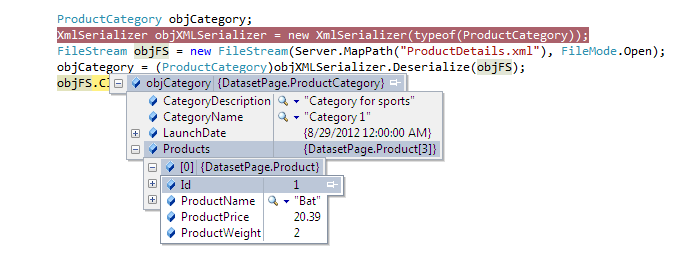
In this example we took XML serialized file "ProductDetails.xml" and deserialize this into object with populating data back.
You can see in the output image that "ProductCategory" object fill from the "ProductDetails.xml" XML File.

C# Examples :
    [XmlRoot("productCategory")]
    public class ProductCategory
    {
        [XmlElement("categoryName")]
        public string CategoryName;

        [XmlElement("categoryDescription")]
        public string CategoryDescription;
        [XmlElement(ElementName = "launchDate", DataType = "date")]
        public DateTime LaunchDate;
        [XmlArray("products")]
        [XmlArrayItem("product")]
        public Product[] Products;
        public ProductCategory()
        {
            // Default constructor for deserialization.
        }
        public ProductCategory(string categoryName, string categoryDescription, DateTime launchDate)
        {
            this.CategoryName = categoryName;
            this.CategoryDescription = categoryDescription;
            this.LaunchDate = launchDate;
        }
    }
    public class Product
    {
        [XmlElement("productName")]
        public string ProductName;
        [XmlElement("productWeight")]
        public decimal ProductWeight;
        [XmlElement("productPrice")]
        public decimal ProductPrice;
                
        [XmlAttributeAttribute(AttributeName = "id")]
        public int Id;
        public Product()
        {

        }
        public Product(int productId, string productName, decimal productWeight , decimal productPrice)
        {
            this.Id =  productId;
            this.ProductName = productName;
            this.ProductWeight = productWeight;
            this.ProductPrice = productPrice;
            
        }
    }
    protected void Page_Load(object sender, EventArgs e)
    {

        ProductCategory objCategory;
        XmlSerializer objXMLSerializer = new XmlSerializer(typeof(ProductCategory));
        FileStream objFS = new FileStream(Server.MapPath("ProductDetails.xml"), FileMode.Open);
        objCategory = (ProductCategory)objXMLSerializer.Deserialize(objFS);
        objFS.Close();

    }

VB.net Examples :
    <XmlRoot("productCategory")> _
    Public Class ProductCategory
        <XmlElement("categoryName")> _
        Public CategoryName As String

        <XmlElement("categoryDescription")> _
        Public CategoryDescription As String
        <XmlElement(ElementName:="launchDate", DataType:="date")> _
        Public LaunchDate As DateTime
        <XmlArray("products")> _
        <XmlArrayItem("product")> _
        Public Products() As Product
        Public Sub New()

        End Sub
        Public Sub New(ByVal categoryName As String, ByVal categoryDescription As String, ByVal launchDate As DateTime)
            Me.CategoryName = categoryName
            Me.CategoryDescription = categoryDescription
            Me.LaunchDate = launchDate
        End Sub
    End Class
    Public Class Product
        <XmlElement("productName")> _
        Public ProductName As String
        <XmlElement("productWeight")> _
        Public ProductWeight As Decimal
        <XmlElement("productPrice")> _
        Public ProductPrice As Decimal

        <XmlAttributeAttribute(AttributeName:="id")> _
        Public Id As Integer
        Public Sub New()

        End Sub
        Public Sub New(ByVal productId As Integer, ByVal productName As String, ByVal productWeight As Decimal, ByVal productPrice As Decimal)
            Me.Id = productId
            Me.ProductName = productName
            Me.ProductWeight = productWeight
            Me.ProductPrice = productPrice

        End Sub
    End Class
  
    Protected Sub Page_Load(ByVal sender As Object, ByVal e As System.EventArgs) Handles Me.Load

        Dim objCategory As New ProductCategory
        Dim objXMLSerializer As New XmlSerializer(Type.GetType(objCategory.ToString()))
        Dim objFS As FileStream = New FileStream(Server.MapPath("ProductDetails.xml"), FileMode.Open)
        objCategory = objXMLSerializer.Deserialize(objFS)
        objFS.Close()
    End Sub

XML File ("ProductDetails.xml") :
<?xml version="1.0"?>
<productCategory xmlns:xsi="http://www.w3.org/2001/XMLSchema-instance" xmlns:xsd="http://www.w3.org/2001/XMLSchema">
  <categoryName>Category 1</categoryName>
  <categoryDescription>Category for sports</categoryDescription>
  <launchDate>2012-08-29</launchDate>
  <products>
    <product id="1">
      <productName>Bat</productName>
      <productWeight>2</productWeight>
      <productPrice>20.39</productPrice>
    </product>
    <product id="2">
      <productName>Ball</productName>
      <productWeight>1</productWeight>
      <productPrice>2.90</productPrice>
    </product>
    <product id="3">
      <productName>Stumps</productName>
      <productWeight>3</productWeight>
      <productPrice>50.70</productPrice>
    </product>
  </products>
</productCategory>

Output : 
(To view original image , click on image)

Click Here to view "XML Serialization of Class Objects with C# Examples and VB.Net Examples". Click Here...

This is very useful .Net Tips.

For Beginning .Net articles. Click Here...

To learn more regarding XML. Click Here...

Note : Give Us your valuable feedback in comments. Give your suggestions in this article so we can update our articles accordingly that.


Wednesday, 29 August 2012

Click Here to Download XMLSerializationAndDeserializationApplication.zip

Note : This application contains both serialize and deserialize exmples. Goto File menu and Download after click on download link.

There is a need where you want objects data into XML format.
You can achieve this using XML Serialization.
Using XML Serialization you can convert custom objects data into XML and XML into custom objects.
We are using "XmlSerializer" class available in "System.Xml.Serialization" namespace.
There is some prerequisite for custom object class that need to know.

  • The classes that are going to serialize must have a default zero-argument constructor. XmlSerializer use this constructor at a time of creating the new object during deserialization process.
  • XmlSerializer serializes only public variables and properties.
  • All class properties must be readable and writable. Because XmlSerializer uses the property to retrieve information and the property to restore the data after deserialization.

To use XML serialization, you must do mark up data objects with attributes that indicate the desired XML mapping. These attributes are available in the System.Xml.Serialization namespace.
  • XmlRoot indicate the name of the root element of the XML file. By default, XmlSerializer will use the name of the class. This attribute apply to the class declaration.  
  • XmlElement indicates the element name that use for a property or public variable. By default, XmlSerializer will use the name of the property or public variable.
  • XmlAttribute indicate that a property or public variable serialized as an attribute.
  • XmlIgnore indicate that a property or public variable should not be serialized in serialization process.
  • XmlEnum indicate that the text that should be used at the time of serializing enumerated values.

Here is example for this.
In this example we serialize object into XML.
We are taking two classes "ProductCategory" and "Product". We create object of this class fill some data and generate xml using XMLSerialization.

C# Examples :
    [XmlRoot("productCategory")]
    public class ProductCategory
    {
        [XmlElement("categoryName")]
        public string CategoryName;

        [XmlElement("categoryDescription")]
        public string CategoryDescription;
        [XmlElement(ElementName = "launchDate", DataType = "date")]
        public DateTime LaunchDate;
        [XmlArray("products")]
        [XmlArrayItem("product")]
        public Product[] Products;
        public ProductCategory()
        {

        }
        public ProductCategory(string categoryName, string categoryDescription, DateTime launchDate)
        {
            this.CategoryName = categoryName;
            this.CategoryDescription = categoryDescription;
            this.LaunchDate = launchDate;
        }
    }
    public class Product
    {
        [XmlElement("productName")]
        public string ProductName;
        [XmlElement("productWeight")]
        public decimal ProductWeight;
        [XmlElement("productPrice")]
        public decimal ProductPrice;
                
        [XmlAttributeAttribute(AttributeName = "id")]
        public int Id;
        public Product()
        {
            // Default constructor for serialization.
        }
        public Product(int productId, string productName, decimal productWeight , decimal productPrice)
        {
            this.Id =  productId;
            this.ProductName = productName;
            this.ProductWeight = productWeight;
            this.ProductPrice = productPrice;
            
        }
    }
    protected void Page_Load(object sender, EventArgs e)
    {

        // Create the product catalog.
        
        ProductCategory objCategory = new ProductCategory("Category 1", "Category for sports", DateTime.Now);
        Product[] lstProducts = new Product[3];
        lstProducts[0] = new Product(1,"Bat", 2, 20.39m);
        lstProducts[1] = new Product(2,"Ball", 1, 2.90m);
        lstProducts[2] = new Product(3,"Stumps", 3, 50.70m);
        objCategory.Products = lstProducts;
        XmlSerializer objXMLSerializer = new XmlSerializer(typeof(ProductCategory));
        FileStream objFS = new FileStream( Server.MapPath( "ProductDetails.xml"), FileMode.Create);
        objXMLSerializer.Serialize(objFS, objCategory);
        objFS.Close();
    }

VB.net Examples :
    <XmlRoot("productCategory")> _
    Public Class ProductCategory
        <XmlElement("categoryName")> _
        Public CategoryName As String

        <XmlElement("categoryDescription")> _
        Public CategoryDescription As String
        <XmlElement(ElementName:="launchDate", DataType:="date")> _
        Public LaunchDate As DateTime
        <XmlArray("products")> _
        <XmlArrayItem("product")> _
        Public Products() As Product
        Public Sub New()

        End Sub
        Public Sub New(ByVal categoryName As String, ByVal categoryDescription As String, ByVal launchDate As DateTime)
            Me.CategoryName = categoryName
            Me.CategoryDescription = categoryDescription
            Me.LaunchDate = launchDate
        End Sub
    End Class
    Public Class Product
        <XmlElement("productName")> _
        Public ProductName As String
        <XmlElement("productWeight")> _
        Public ProductWeight As Decimal
        <XmlElement("productPrice")> _
        Public ProductPrice As Decimal

        <XmlAttributeAttribute(AttributeName:="id")> _
        Public Id As Integer
        Public Sub New()

        End Sub
        Public Sub New(ByVal productId As Integer, ByVal productName As String, ByVal productWeight As Decimal, ByVal productPrice As Decimal)
            Me.Id = productId
            Me.ProductName = productName
            Me.ProductWeight = productWeight
            Me.ProductPrice = productPrice

        End Sub
    End Class


    Protected Sub Page_Load(ByVal sender As Object, ByVal e As System.EventArgs) Handles Me.Load

        Dim objCategory As ProductCategory = New ProductCategory("Category 1", "Category for sports", DateTime.Now)
        Dim lstProducts() As Product = New Product(2) {}
        lstProducts(0) = New Product(1, "Bat", 2, 20.39)
        lstProducts(1) = New Product(2, "Ball", 1, 2.9)
        lstProducts(2) = New Product(3, "Stumps", 3, 50.7)
        objCategory.Products = lstProducts
        Dim objXMLSerializer As XmlSerializer = New XmlSerializer(Type.GetType(objCategory.ToString()))
        Dim objFS As FileStream = New FileStream(Server.MapPath("ProductDetails.xml"), FileMode.Create)
        objXMLSerializer.Serialize(objFS, objCategory)
        objFS.Close()

    End Sub

Output XML File ("ProductDetails.xml") :
<?xml version="1.0"?>
<productCategory xmlns:xsi="http://www.w3.org/2001/XMLSchema-instance" xmlns:xsd="http://www.w3.org/2001/XMLSchema">
  <categoryName>Category 1</categoryName>
  <categoryDescription>Category for sports</categoryDescription>
  <launchDate>2012-08-29</launchDate>
  <products>
    <product id="1">
      <productName>Bat</productName>
      <productWeight>2</productWeight>
      <productPrice>20.39</productPrice>
    </product>
    <product id="2">
      <productName>Ball</productName>
      <productWeight>1</productWeight>
      <productPrice>2.90</productPrice>
    </product>
    <product id="3">
      <productName>Stumps</productName>
      <productWeight>3</productWeight>
      <productPrice>50.70</productPrice>
    </product>
  </products>
</productCategory>

Click Here to View "XML Deserialization with C# Examples and VB.Net Examples". Click Here...

This is very useful .Net Tips.

For Beginning .Net articles. Click Here...

To learn more regarding XML. Click Here...

Note : Give Us your valuable feedback in comments. Give your suggestions in this article so we can update our articles accordingly that.


Tuesday, 28 August 2012

There is a need in application to upload a file and store into SQL Server Database table.
You can do this very simple way.
File is stored in sql server as binary data. You need to set "varbinary" data type of the column in which you want to store file. You need to take "varbinary(MAX)" data type.

Here is example for this.
In this example we take one "product_master" table. This tables contains columns like "product_id" , "product_name", "product_document_filename" and "product_document".
This "product_document" column store whole file as binary. so that we need to set it's datatype ""varbinary(MAX)". We are inserting uploaded file name in "product_document_filename" column whose datatype is nvarchar(1000).
In this example we take product name as textbox and for Upload file we take FileUpload control.

ASPX Code :
        <table>
            <tr>
                <td>
                    Product Title :
                </td>
                <td>
                    <asp:TextBox runat="server" ID="txtProductTitle"  ></asp:TextBox>
                </td>
            </tr>
            <tr>
                <td>
                    Product Document :
                </td>
                <td>
                    <asp:FileUpload runat="server" ID="fuDocument" />
                </td>
            </tr>
        </table>
        <asp:Button runat="server" ID="btnSave" Text="Save" onclick="btnSave_Click" />

C# Examples :
    protected void btnSave_Click(object sender, EventArgs e)
    {
        SqlCommand objCmd = new SqlCommand();
        SqlConnection objConn = new SqlConnection();
        objConn.ConnectionString = @"Data Source=.\SQLEXPRESS;" +
                                   "Initial Catalog=TempDatabase;" +
                                   "User ID=sa;Password=sa;";

        objConn.Open();
        objCmd.Connection = objConn;

        objCmd.CommandText = "insert into product_master(product_name,product_document_filename,product_document) values(@product_name,@product_document_filename,@product_document)";
        objCmd.Parameters.AddWithValue("@product_name", txtProductTitle.Text.Trim());

        if (fuDocument.HasFile == true)
        {
            objCmd.Parameters.AddWithValue("@product_document_filename", fuDocument.FileName);
            objCmd.Parameters.AddWithValue("@product_document", fuDocument.FileBytes);
        }
        else
        {
            objCmd.Parameters.AddWithValue("@product_document_filename", DBNull.Value);
            objCmd.Parameters.AddWithValue("@product_document", DBNull.Value);
        }
        objCmd.ExecuteNonQuery();
        objConn.Close();
    }

VB.net Examples :
    Protected Sub btnSave_Click(ByVal sender As Object, ByVal e As EventArgs) Handles btnSave.Click
        Dim objCmd As New SqlCommand()
        Dim objConn As New SqlConnection()
        objConn.ConnectionString = "Data Source=.\SQLEXPRESS;" & "Initial Catalog=TempDatabase;" & "User ID=sa;Password=sa;"

        objConn.Open()
        objCmd.Connection = objConn

        objCmd.CommandText = "insert into product_master(product_name,product_document_filename,product_document) values(@product_name,@product_document_filename,@product_document)"
        objCmd.Parameters.AddWithValue("@product_name", txtProductTitle.Text.Trim())

        If fuDocument.HasFile = True Then
            objCmd.Parameters.AddWithValue("@product_document_filename", fuDocument.FileName)
            objCmd.Parameters.AddWithValue("@product_document", fuDocument.FileBytes)
        Else
            objCmd.Parameters.AddWithValue("@product_document_filename", DBNull.Value)
            objCmd.Parameters.AddWithValue("@product_document", DBNull.Value)
        End If
        objCmd.ExecuteNonQuery()
        objConn.Close()
    End Sub

Output (Database Table Structure) : 


Output (Create Product Screen) : 


Output (Inserted Product Details in Table) : 


This is very useful .Net Tips.

For Beginning .Net articles. Click Here...

Learn other ADO.Net Examples over here. Click Here...

Note : Give Us your valuable feedback in comments. Give your suggestions in this article so we can update our articles accordingly that.


Friday, 3 August 2012

You can delete data or records into SQL Server Database tables using SqlCommand Class.
You can use "ExecuteNonQuery" method of SqlCommand Class.
You can delete all or particular criteria records using where clause.
This article is very useful for .Net Beginners. 


Here is example for this.
In this example we delete record from "product_master" table. In this table we have two columns. First product_id it's data type is bigint and this is an Identity column, and Second is product_name it's datatype is nvarchar(500). "product_id" is an identity column.
We delete record by it's product_id, so only one record is deleted.
"ExecuteNonQuery" method also returns affrected records count as integer. so you can check that records is deleted or not and also get how many records are deleted.

C# Examples :
        DataTable objTable = new DataTable();
        int intAffectedRecordsCount = 0;
        SqlConnection objConn = new SqlConnection();
        objConn.ConnectionString = @"Data Source=.\SQLEXPRESS;" +
                                   "Initial Catalog=TempDatabase;" +
                                   "User ID=sa;Password=sa;";  

        SqlCommand objcmd = new SqlCommand();
        objcmd.CommandText = "DELETE FROM product_master WHERE product_id=@product_id";
        objcmd.Parameters.AddWithValue("@product_id", 12);
        objcmd.CommandType = CommandType.Text;
        objcmd.Connection = objConn;
        objcmd.Connection.Open();

        intAffectedRecordsCount=objcmd.ExecuteNonQuery();
        Response.Write("<b>Affrected Records Count : </b> " + intAffectedRecordsCount);
        objcmd.Connection.Close();

        objcmd.Dispose();
        objConn.Dispose();

VB.net Examples :
        Dim objTable As New DataTable()
        Dim intAffectedRecordsCount As Integer = 0
        Dim objConn As New SqlConnection()
        objConn.ConnectionString = "Data Source=.\SQLEXPRESS;" & _
                                   "Initial Catalog=TempDatabase;" & _
                                   "User ID=sa;Password=sa;"

        Dim objcmd As New SqlCommand()
        objcmd.CommandText = "DELETE FROM product_master WHERE product_id=@product_id"
        objcmd.Parameters.AddWithValue("@product_id", 12)
        objcmd.CommandType = CommandType.Text
        objcmd.Connection = objConn

        objcmd.Connection.Open()

        intAffectedRecordsCount = objcmd.ExecuteNonQuery()
        Response.Write("<b>Affrected Records Count : </b> " & intAffectedRecordsCount)

        objcmd.Connection.Close()

        objcmd.Dispose()
        objConn.Dispose()

Output :

Learn other ADO.Net Examples over here. Click Here...

Note : Give Us your valuable feedback in comments. Give your suggestions in this article so we can update our articles accordingly that.


Saturday, 28 July 2012

You can update data or records into SQL Server Database tables using SqlCommand Class.
You can use "ExecuteNonQuery" method of SqlCommand Class.
You can update all or particular criteria records using where clause.
This article is very useful for .Net Beginners. 

Here is example for this.
In this example we update record in "product_master" table. In this table we have two columns. First product_id it's data type is bigint and this is an Identity column, and Second is product_name it's datatype is nvarchar(500). "product_id" is an identity column.
We update product name by it's product_id column, so only one record is updated.
"ExecuteNonQuery" method also returns affected records count as integer. so you can check that records is updated or not and also get how many records are updated.

C# Examples :
        DataTable objTable = new DataTable();
        int intAffectedRecordsCount = 0;
        SqlConnection objConn = new SqlConnection();
        objConn.ConnectionString = @"Data Source=.\SQLEXPRESS;" +
                                   "Initial Catalog=TempDatabase;" +
                                   "User ID=sa;Password=sa;";  

        SqlCommand objcmd = new SqlCommand();
        objcmd.CommandText = "UPDATE product_master SET product_name =@product_name WHERE product_id=@product_id";
        objcmd.Parameters.AddWithValue("@product_name", "Cabinet");
        objcmd.Parameters.AddWithValue("@product_id", 12);
        objcmd.CommandType = CommandType.Text;
        objcmd.Connection = objConn;
        objcmd.Connection.Open();

        intAffectedRecordsCount=objcmd.ExecuteNonQuery();
        Response.Write("<b>Affrected Records Count : </b> " + intAffectedRecordsCount);
        objcmd.Connection.Close();

        objcmd.Dispose();
        objConn.Dispose();

VB.net Examples :
        Dim objTable As New DataTable()
        Dim intAffectedRecordsCount As Integer = 0
        Dim objConn As New SqlConnection()
        objConn.ConnectionString = "Data Source=.\SQLEXPRESS;" & _
                                   "Initial Catalog=TempDatabase;" & _
                                   "User ID=sa;Password=sa;"

        Dim objcmd As New SqlCommand()
        objcmd.CommandText = "UPDATE product_master SET product_name =@product_name WHERE product_id=@product_id"
        objcmd.Parameters.AddWithValue("@product_name", "Cabinet")
        objcmd.Parameters.AddWithValue("@product_id", 12)
        objcmd.CommandType = CommandType.Text
        objcmd.Connection = objConn

        objcmd.Connection.Open()

        intAffectedRecordsCount = objcmd.ExecuteNonQuery()
        Response.Write("<b>Affrected Records Count : </b> " & intAffectedRecordsCount)

        objcmd.Connection.Close()

        objcmd.Dispose()
        objConn.Dispose()

Output :


Learn other ADO.Net Examples over here. Click Here...

Note : Give Us your valuable feedback in comments. Give your suggestions in this article so we can update our articles accordingly that.


Thursday, 26 July 2012

You can insert data or records in to SQL Server Database tables using SqlCommand Class.
You can use "ExecuteNonQuery" method of SqlCommand Class.
This article is very useful for .Net Beginners.

Here is example for this.
In this example we insert record in "product_master" table. In this table we have two columns. First product_id it's data type is bigint and this is an Identity column, and Second is product_name it's datatype is nvarchar(500).
"product_id" is an identity column so we did not provide this column in Insert query, this column automatically generate new identical number and stored. so we only insert product_name data in INSERT query.


C# Examples :
        SqlConnection objConn = new SqlConnection();
        objConn.ConnectionString = @"Data Source=.\SQLEXPRESS;" +
                                   "Initial Catalog=TempDatabase;" +
                                   "User ID=sa;Password=sa;";  

        SqlCommand objcmd = new SqlCommand();
        objcmd.CommandText = "Insert INTO product_master(product_name) values(@product_name)";
        objcmd.Parameters.AddWithValue("@product_name", "Cabinet");
        objcmd.CommandType = CommandType.Text;
        objcmd.Connection = objConn;
        objcmd.Connection.Open();

        objcmd.ExecuteNonQuery();
        objcmd.Connection.Close();

        objcmd.Dispose();
        objConn.Dispose();

VB.net Examples :
        Dim objConn As New SqlConnection()
        objConn.ConnectionString = "Data Source=.\SQLEXPRESS;" & _
                                   "Initial Catalog=TempDatabase;" & _
                                   "User ID=sa;Password=sa;"

        Dim objcmd As New SqlCommand()
        objcmd.CommandText = "Insert INTO product_master(product_name) values(@product_name)"
        objcmd.Parameters.AddWithValue("@product_name", "Cabinet")
        objcmd.CommandType = CommandType.Text
        objcmd.Connection = objConn

        objcmd.Connection.Open()

        objcmd.ExecuteNonQuery()
        objcmd.Connection.Close()

        objcmd.Dispose()
        objConn.Dispose()

Learn other ADO.Net Examples over here. Click Here...

Note : Give Us your valuable feedback in comments. Give your suggestions in this article so we can update our articles accordingly that.


Monday, 16 July 2012

You can get current database name using In Built SQL function "DB_NAME()".

SQL Query :
SELECT DB_NAME() AS DataBaseName

Output :


This is the very useful SQL Server Scripts.

Note : Give Us your valuable feedback in comments. Give your suggestions in this article so we can update our articles accordingly that.

Monday, 9 July 2012

If you need to process the records one by one or iterate the records from database table for that you need to use IDataReader instance. There are various implementation of IDataReader class. We are using System.Data.SqlClient.SqlDataReader class to iterate the records.
The IDataReader interface extends the System.Data.IDataRecord interface. These interfaces declare the functionality to access both the data and the structure of the data contained in the result set.

Here is the example.
In this example we execute two select queries first query is for to get product details and display it's records on screen, and second query is for get employee_master details and display it's table's metadata details on screen.

C# Examples :
        // Create a new SqlConnection object.
        using (SqlConnection objCon = new SqlConnection())
        {
            // Configure the SqlConnection object's connection string.
            objCon.ConnectionString =@"Data Source=JAYESH-PC\SQLEXPRESS;" + 
                                     "Initial Catalog=TempDatabase;" +  
                                     "User ID=sa;Password=ibmx206;";  
            using (SqlCommand objCommand = objCon.CreateCommand())
            {
                objCommand.CommandType = CommandType.Text;
                objCommand.CommandText = "SELECT product_id,product_name FROM product_master " +
                " ORDER BY product_name;SELECT * FROM employee_master";
                
                objCon.Open();
                // Execute the command and obtain a SqlReader.
                using (SqlDataReader objReader = objCommand.ExecuteReader())
                {
                    // Process the first set of results and display the
                    // content of the result set.
                    Response.Write("Prodct details (By Product Name).");

                    while (objReader.Read())
                    {
                        Response.Write(string.Format(" <br/> {0} - {1} ",
                        objReader["product_id"], // Use string index
                        objReader[1])); // Use ordinal index
                    }
                    Response.Write("<br/><br/>");
                    // Process the second set of results and display 
                    objReader.NextResult();
                    Response.Write("Employee Details.");
                    for (int field = 0; field < objReader.FieldCount; field++)
                    {
                        Response.Write(string.Format("<br/><b> Column Name:</b>{0}   <b>Data Type:</b>{1}",
                        objReader.GetName(field),
                        objReader.GetDataTypeName(field)));
                    }
                }
            }
        }

VB.net Examples :
        ' Create a new SqlConnection object.
        Using objCon As New SqlConnection()
            ' Configure the SqlConnection object's connection string.
            objCon.ConnectionString = "Data Source=JAYESH-PC\SQLEXPRESS;" & "Initial Catalog=TempDatabase;" & "User ID=sa;Password=ibmx206;"
            Using objCommand As SqlCommand = objCon.CreateCommand()
                objCommand.CommandType = CommandType.Text
                objCommand.CommandText = "SELECT product_id,product_name FROM product_master " & " ORDER BY product_name;SELECT * FROM employee_master"

                objCon.Open()
                ' Execute the command and obtain a SqlReader.
                Using objReader As SqlDataReader = objCommand.ExecuteReader()
                    ' Process the first set of results and display the
                    ' content of the result set.
                    Response.Write("Prodct details (By Product Name).")

                    While objReader.Read()
                        ' Use string index
                        ' Use ordinal index
                        Response.Write(String.Format(" <br/> {0} - {1} ", objReader("product_id"), objReader(1)))
                    End While
                    Response.Write("<br/><br/>")
                    ' Process the second set of results and display 
                    objReader.NextResult()
                    Response.Write("Employee Details.")
                    For field As Integer = 0 To objReader.FieldCount - 1
                        Response.Write(String.Format("<br/><b> Column Name:</b>{0}   <b>Data Type:</b>{1}", objReader.GetName(field), objReader.GetDataTypeName(field)))
                    Next
                End Using
            End Using
        End Using

Output :

You can access the SqlDataReder objects data using Field name, ordinal index and typed data methods. The typed data contains various methods like GetBoolean, GetByte, GetBytes, GetChar, GetChars, GetDateTime, GetDecimal, GetDouble, GetFloat, GetGuid, GetInt16, GetInt32, GetInt64, GetString, GetValue, and GetValues. Each of the these methods takes an integer argument that identifies the zero-based index of the column from which the data should be returned.

After the use of the data reader, you must have to call its Close method so that you can use the database connection again. IDataReader extends System.IDisposable interface, so that each data reader class implements the Dispose method. Dispose automatically calls Close method.

This article is very useful for .Net Beginners.

Note : Give Us your valuable feedback in comments. Give your suggestions in articles so we can update our articles accordingly that.


Monday, 2 July 2012

This is very managed and safe way to use parameter to execute SQL query and Stored Procedure. By doing this you can avoid sql injection type of problems. We need to set the argument of sql query or  stored procedure to use parameters in a SQL command object.You need to create a parameter object for this.
All parameter objects implement the System.Data.IDataParameter interface.
After that you can configure the parameter object’s values, data types,  and directions, and add them to the command object’s parameter collection using the IDbCommand.Parameters.Add method.

 The ODBC, OLE DB, and SQL Server CE data providers support positional parameters, the location of each argument is identified by a question mark "?".
For example, the below query identifies two locations to be substituted with parameter values:

UPDATE product_master SET product_name= ? WHERE product_id = ?

The SQL Server and Oracle data providers support named parameters, which allow to identify
each parameter location using a name preceded by the at symbol "@".
For example :
UPDATE product_master SET product_name= @product_name=  WHERE product_id = @product_id

To specify the parameter values into a command, we must create parameter objects of the specific type and add them to the command object’s parameter collection accessible through the Parameters property.
Here is example for this.
In this example we take two functions , first function is for to execute sql query and second function is for execute stored procedure.

C# Examples :
    public void ParameterizedCommand(SqlConnection objCon, int product_id, string product_name)
    {
        // Create a new command.
        using (SqlCommand com = objCon.CreateCommand())
        {
            com.CommandType = CommandType.Text;
            com.CommandText = "UPDATE product_master SET product_name = @product_name WHERE product_id = @product_id";
            // Create a SqlParameter object.
            SqlParameter objParam = com.CreateParameter();
            objParam.ParameterName = "@product_name";
            objParam.SqlDbType = SqlDbType.VarChar;
            objParam.Value = product_name;
            com.Parameters.Add(objParam);
            
            com.Parameters.Add("@product_id", SqlDbType.Int).Value = product_id;
            //Execute command
            int result = com.ExecuteNonQuery();
            if (result == 1)
            {
                Response.Write("Product title updated.");
            }
            else
            {
                Response.Write("Product title not updated.");
            }
        }
    }
    public void ParameterizedStoredProcedure(SqlConnection objCon, string product_name)
    {
        // Create and configure a new command.
        using (SqlCommand com = objCon.CreateCommand())
        {
            com.CommandType = CommandType.StoredProcedure;
            com.CommandText = "sp_product_details_by_product_name";
            // Create a SqlParameter object .
            com.Parameters.Add("@product_id", SqlDbType.VarChar).Value =product_name;
            
            // Execute command.
            using (IDataReader objReader = com.ExecuteReader())
            {
                Response.Write( string.Format( "Product Name ({0}).", product_name));
                while (objReader.Read())
                {
                    // Display the product details.
                    Response.Write( string.Format( " {0} = {1}", objReader["product_id"], objReader["product_name"]));
                }
            }
        }
    }
    protected void Page_Load(object sender, EventArgs e)
    {

        // Create a new SqlConnection object.
        using (SqlConnection objCon = new SqlConnection())
        {
            // Configure the SqlConnection object's connection string.
            objCon.ConnectionString = @"Data Source=.\SQLEXPRESS;" + // SQL Server instance , You can also set remote database
                                         "Initial Catalog=TempDatabase;" + // the sample TempDatabase DB
                                         "User ID=sa;Password=ibmx206;";  //Set Credential

            // Open the database connection and execute the example
            // commands through the connection.
            objCon.Open();
            ParameterizedCommand(objCon, 8,"KeyBoard");
            
            ParameterizedStoredProcedure(objCon, "CPU");
            
        };
    }

VB.net Examples :
    Public Sub ParameterizedCommand(ByVal objCon As SqlConnection, ByVal product_id As Integer, ByVal product_name As String)
        ' Create a new command.
        Using com As SqlCommand = objCon.CreateCommand()
            com.CommandType = CommandType.Text
            com.CommandText = "UPDATE product_master SET product_name = @product_name WHERE product_id = @product_id"
            ' Create a SqlParameter object.
            Dim objParam As SqlParameter = com.CreateParameter()
            objParam.ParameterName = "@product_name"
            objParam.SqlDbType = SqlDbType.VarChar
            objParam.Value = product_name
            com.Parameters.Add(objParam)

            com.Parameters.Add("@product_id", SqlDbType.Int).Value = product_id
            'Execute command
            Dim result As Integer = com.ExecuteNonQuery()
            If result = 1 Then
                Response.Write("Product title updated.")
            Else
                Response.Write("Product title not updated.")
            End If
        End Using
    End Sub
    Public Sub ParameterizedStoredProcedure(ByVal objCon As SqlConnection, ByVal product_name As String)
        ' Create and configure a new command.
        Using com As SqlCommand = objCon.CreateCommand()
            com.CommandType = CommandType.StoredProcedure
            com.CommandText = "sp_product_details_by_product_name"
            ' Create a SqlParameter object .
            com.Parameters.Add("@product_id", SqlDbType.VarChar).Value = product_name

            ' Execute command.
            Using objReader As IDataReader = com.ExecuteReader()
                Response.Write(String.Format("Product Name ({0}).", product_name))
                While objReader.Read()
                    ' Display the product details.
                    Response.Write(String.Format(" {0} = {1}", objReader("product_id"), objReader("product_name")))
                End While
            End Using
        End Using
    End Sub
    Protected Sub Page_Load(ByVal sender As Object, ByVal e As System.EventArgs) Handles Me.Load
        ' Create a new SqlConnection object.
        Using objCon As New SqlConnection()
            ' Configure the SqlConnection object's connection string.
            objCon.ConnectionString = "Data Source=.\SQLEXPRESS;" & _
                                      "Initial Catalog=TempDatabase;" & _
                                      "User ID=sa;Password=sa;"
            ' Open the database connection and execute the example
            ' commands through the connection.
            objCon.Open()
            ParameterizedCommand(objCon, 8, "KeyBoard")


            ParameterizedStoredProcedure(objCon, "CPU")
        End Using

    End Sub

 You can also directly use SQLParameter class object with SQLCommand and SQLConnection objects.


In this article we are using both Text and StoredProcedure as command type. 

Note : Give Us your valuable feedback in comments. Give your suggestions in articles so we can update our articles accordingly that.