Showing posts with label List. Show all posts

Thursday, 5 July 2012

XDocument is Introduce in System.Xml.Linq namespace.
XDocument is more friendlier and easy to use than XMLDocument.
Earlier we are using XMLDocument for read and processing XML File.
Syntax of retrieving element from XML document is different than XMLDocument.
Every .Net Beginners needs to know this. 

Here is example for this.
In this example We load Books.xml file and read data from this file using LINQ to XML and display in grid as well as display count of books.

XML File : (Books.xml)
<?xml version="1.0" encoding="utf-8" ?>
<Books>
   <Book>
    <Title>ASP.NET</Title>
    <ISBN>asp1</ISBN>
    <ReleaseDate>11/11/2010</ReleaseDate>
    <Pages>200</Pages>
    <PublisherId>1</PublisherId>
  </Book>
  <Book>
    <Title>C#.NET</Title>
    <ISBN>c#2</ISBN>
    <ReleaseDate>10/11/2010</ReleaseDate>
    <Pages>500</Pages>
    <PublisherId>1</PublisherId>
  </Book>
  <Book>
    <Title>VB.NET</Title>
    <ISBN>vb3</ISBN>
    <ReleaseDate>5/5/2009</ReleaseDate>
    <Pages>400</Pages>
    <PublisherId>1</PublisherId>
  </Book>
  <Book>
    <Title>SQL Server</Title>
    <ISBN>sql4</ISBN>
    <ReleaseDate>6/9/2010</ReleaseDate>
    <Pages>300</Pages>
    <PublisherId>2</PublisherId>
  </Book>
  <Book>
    <Title>JAVA</Title>
    <ISBN>java5</ISBN>
    <ReleaseDate>8/5/2011</ReleaseDate>
    <Pages>400</Pages>
    <PublisherId>3</PublisherId>
  </Book>
</Books>


ASPX Code :
<form id="form1" runat="server">
    <div>
        <asp:GridView ID="gvBooks" runat="server">
        </asp:GridView>
    </div>
</form>

C# Example :
        XDocument objBooksXML = XDocument.Load(Server.MapPath("books.xml"));
        var objBooks = from book in
                       objBooksXML.Descendants("Book")
                       select new { 
                                    Title = book.Element("Title").Value, 
                                    Pages = book.Element("Pages").Value 
                                  };

        Response.Write(String.Format("Total {0} books.", objBooks.Count()));
        gvBooks.DataSource = objBooks;
        gvBooks.DataBind();

VB.net Example :
        Dim objBooksXML As XDocument = XDocument.Load(Server.MapPath("books.xml"))
        Dim objBooks = From book In objBooksXML...<Book>
                       Select New With {.Title = book.<Title>.Value, .Pages = book.<Pages>.Value}
        Response.Write(String.Format("Total {0} books.", objBooks.Count()))
        gvBooks.DataSource = objBooks
        gvBooks.DataBind()

Output : 


Note : Give Us your valuable feedback in comments. Give your suggestions in this article so we can update our articles accordingly that. 


Tuesday, 3 July 2012

XmlReader provides fast, forward-only, read-only access to XML documents. These documents may contain various elements in multiple namespaces. XmlTextReader and XmlNodeReader classes derive from XMLReader and work as an abstract class for these classes.
With help of XmlReader Class we can read xml file and also extract data from xml file.
XmlReader class available in System.Xml namespace.
Every .Net Beginners needs to know this.

Here is example of this.
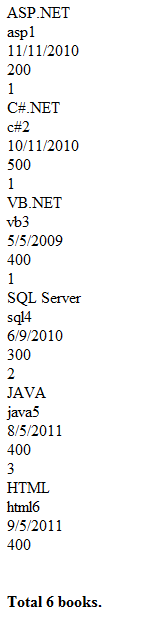
In this example we have "books.xml" file. This file has many books with element <book>. We count books in books.xml and also display xml file's data without xml elements.
In this example we are also taking object of "XmlReaderSettings" Class. With the help of this class we can Ignore Whitespace and Comments using IgnoreWhitespace and IgnoreComments properties to parse XML File.

XML File : (Books.xml)
<?xml version="1.0" encoding="utf-8" ?>
<Books>
   <Book>
    <Title>ASP.NET</Title>
    <ISBN>asp1</ISBN>
    <ReleaseDate>11/11/2010</ReleaseDate>
    <Pages>200</Pages>
    <PublisherId>1</PublisherId>
  </Book>
  <Book>
    <Title>C#.NET</Title>
    <ISBN>c#2</ISBN>
    <ReleaseDate>10/11/2010</ReleaseDate>
    <Pages>500</Pages>
    <PublisherId>1</PublisherId>
  </Book>
  <Book>
    <Title>VB.NET</Title>
    <ISBN>vb3</ISBN>
    <ReleaseDate>5/5/2009</ReleaseDate>
    <Pages>400</Pages>
    <PublisherId>1</PublisherId>
  </Book>
  <Book>
    <Title>SQL Server</Title>
    <ISBN>sql4</ISBN>
    <ReleaseDate>6/9/2010</ReleaseDate>
    <Pages>300</Pages>
    <PublisherId>2</PublisherId>
  </Book>
  <Book>
    <Title>JAVA</Title>
    <ISBN>java5</ISBN>
    <ReleaseDate>8/5/2011</ReleaseDate>
    <Pages>400</Pages>
    <PublisherId>3</PublisherId>
  </Book>
  <Book>
    <Title>HTML</Title>
    <ISBN>html6</ISBN>
    <ReleaseDate>9/5/2011</ReleaseDate>
    <Pages>400</Pages>
    
  </Book>
</Books>

C# Example :
        int intCount = 0;
        XmlReaderSettings objSettings = new XmlReaderSettings();
        objSettings.IgnoreWhitespace = true;
        objSettings.IgnoreComments = true;
        string booksFile = Server.MapPath("books.xml");
        using (XmlReader objReader = XmlReader.Create(booksFile, objSettings))
        {
            while (objReader.Read())
            {
                if (objReader.NodeType == XmlNodeType.Element && "Book" == objReader.LocalName)
                {
                     intCount++;
                }
                if (objReader.NodeType ==XmlNodeType.Text )
                {
                    Response.Write("<BR />" + objReader.Value);
                }
            }
        }
        Response.Write(String.Format("<BR /><BR /><BR /><b> Total {0} books.</b>", intCount));

VB.net Example :
        Dim intCount As Integer = 0
        Dim objSettings As New XmlReaderSettings()
        objSettings.IgnoreWhitespace = True
        objSettings.IgnoreComments = True
        Dim booksFile As String = Server.MapPath("books.xml")
        Using objReader As XmlReader = XmlReader.Create(booksFile, objSettings)
            While objReader.Read()
                If objReader.NodeType = XmlNodeType.Element AndAlso "Book" = objReader.LocalName Then
                    intCount += 1
                End If
                If objReader.NodeType = XmlNodeType.Text Then
                    Response.Write("<BR />" + objReader.Value)
                End If
            End While
        End Using
        Response.Write([String].Format("<BR /><BR /><BR /><b> Total {0} books.</b>", intCount))

Output :


Note : Give Us your valuable feedback in comments. Give your suggestions in this article so we can update our articles accordingly that.


Thursday, 7 June 2012

Using a group join you can get group wise data using LINQ.
Here are sample example for this.
In this example there are two classes Books and Publishers. Now we want to display Publisher wise books, One publishers has multiple books. We can do this using LINQ.
Using a group join you can get all the publishers that match a books as a sequence.

C# Example :
    public class Books
    {
        public string Title { get; set; }
        public string ISBN { get; set; }
        public DateTime ReleaseDate { get; set; }
        public int Pages { get; set; }
        public int PublisherId { get; set; }
    }

    protected void Page_Load(object sender, EventArgs e)
    {

        var bookslist = GetBooksList();
        var publisherslist = GetPublishers();
        var query = from pl in publisherslist
                    join bl in bookslist on pl.PublisherId equals bl.PublisherId into plbl
                    select new { pl.PublisherName, BooksLst = plbl };
        foreach (var publishers in query)
        {
            Response.Write("<b>"+ publishers.PublisherName + ":</b><br/>" );
            foreach (var b in publishers.BooksLst)
            {
                Response.Write("&nbsp;&nbsp;&nbsp;&nbsp;" + b.Title + "<br/>");
            }
        }
        Response.Write("<br/><br/>");

    }
    public List<Books> GetBooksList()
    {
        return new List<Books> {
                        new Books { Title="ASP.NET",ISBN="asp1",ReleaseDate= DateTime.Parse( "11/11/2010") ,Pages=200,PublisherId=1},
                        new Books { Title="C#.NET",ISBN="c#2",ReleaseDate= DateTime.Parse( "10/11/2010") ,Pages=500,PublisherId=1},
                        new Books { Title="VB.NET",ISBN="vb3",ReleaseDate= DateTime.Parse( "5/5/2009") ,Pages=400,PublisherId=1},
                        new Books { Title="SQL Server",ISBN="sql4",ReleaseDate= DateTime.Parse( "6/9/2010"),Pages=300,PublisherId=2 },
                        new Books { Title="JAVA",ISBN="java5",ReleaseDate= DateTime.Parse( "8/5/2011"),Pages=400,PublisherId=3 },
                        new Books { Title="HTML",ISBN="html6",ReleaseDate= DateTime.Parse( "9/5/2011"),Pages=400 }
        
        };

    }

    public class Publisher
    {
        public int PublisherId { get; set; }
        public string PublisherName { get; set; }
    }

    public List<Publisher> GetPublishers()
    {
        return new List<Publisher> {
                        new Publisher { PublisherId=1, PublisherName="Microsoft" } ,
                        new Publisher { PublisherId=2, PublisherName="Wrox" } ,
                        new Publisher { PublisherId=3, PublisherName="Sun Publications" }
        };
    }

VB.net Example :
    Public Class Books
        Public Property Title() As String
        Public Property ISBN As String
        Public Property ReleaseDate As Date
        Public Property Pages As Integer
        Public Property PublisherId As Integer
    End Class

    Protected Sub Page_Load(ByVal sender As Object, ByVal e As System.EventArgs) Handles Me.Load

        Dim bookslist = GetBooksList()
        Dim publisherslist = GetPublishers()
        Dim query = From pl In publisherslist _
                    Group Join bl In bookslist On pl.PublisherId Equals bl.PublisherId Into Group _
                    Select New With {.PublisherName = pl.PublisherName, .BooksLst = Group}

        For Each publishers In query
            Response.Write("<b>" + publishers.PublisherName + ":</b><br/>")
            For Each b In publishers.BooksLst
                Response.Write("&nbsp;&nbsp;&nbsp;&nbsp;" + b.Title + "<br/>")
            Next
        Next
        Response.Write("<br/><br/>")

    End Sub
    Public Function GetBooksList() As List(Of Books)
        Dim lstBooks As New List(Of Books) From { _
                                New Books With {.Title = "ASP.NET", .ISBN = "asp1", .ReleaseDate = DateTime.Parse("11/11/2010"), .Pages = 200, .PublisherId = 1}, _
                                New Books With {.Title = "C#.NET", .ISBN = "c#2", .ReleaseDate = DateTime.Parse("10/11/2010"), .Pages = 500, .PublisherId = 1}, _
                                New Books With {.Title = "VB.NET", .ISBN = "vb3", .ReleaseDate = DateTime.Parse("5/5/2009"), .Pages = 400, .PublisherId = 1}, _
                                New Books With {.Title = "SQL Server", .ISBN = "sql4", .ReleaseDate = DateTime.Parse("6/9/2010"), .Pages = 300, .PublisherId = 2}, _
                                New Books With {.Title = "JAVA", .ISBN = "java5", .ReleaseDate = DateTime.Parse("8/5/2011"), .Pages = 400, .PublisherId = 3}, _
                                New Books With {.Title = "HTML", .ISBN = "html6", .ReleaseDate = DateTime.Parse("9/5/2011"), .Pages = 400}}

        Return lstBooks
    End Function
    Public Class Publisher
        Public Property PublisherId() As Integer
        Public Property PublisherName() As String
    End Class
    Public Function GetPublishers() As List(Of Publisher)
        Dim publishers As Publisher() = { _
        New Publisher With {.PublisherId = 1, .PublisherName = "Microsoft"}, _
        New Publisher With {.PublisherId = 2, .PublisherName = "Wrox"}, _
        New Publisher With {.PublisherId = 3, .PublisherName = "Sun Publications"} _
        }
        Return New List(Of Publisher)(publishers)
    End Function

Output :


Tuesday, 5 June 2012

You can also do left outer join using LINQ.

Here are sample example of this.
In this example there is book class which has PublisherId field , this fields contains only numeric values.
If we need to display Publisher Name we have to join this book class object to Publishers class object which has Publisher Name of each Publisher Id key.
There are also some records in Book class which does not have PublisherId and still we want that records and display some special text like "(No Publisher)" in this records.
In this example you can see that "HTML" book does not have publisher id so we can display "(No Publisher)" in Publisher Name column of this record.
In this example we are using special method like DefaultIfEmpty() of LINQ.

ASPX Code :
<form id="form1" runat="server">
    <div>
        <asp:GridView ID="gvBooks" runat="server">
        </asp:GridView>
    </div>
</form>

C# Example :
    public class Books
    {
        public string Title { get; set; }
        public string ISBN { get; set; }
        public DateTime ReleaseDate { get; set; }
        public int Pages { get; set; }
        public int PublisherId { get; set; }
    }

    protected void Page_Load(object sender, EventArgs e)
    {

        var bookslist = GetBooksList();
        var publisherslist=GetPublishers();
        var query = from bl in bookslist
                    join p in publisherslist on bl.PublisherId equals p.PublisherId into joinData
                    from blp in joinData.DefaultIfEmpty()
                    select new { Title = bl.Title, PublisherName = blp == null ? "(No Publisher)" : blp.PublisherName };
        this.gvBooks.DataSource = query;
        this.gvBooks.DataBind();
    }
    public List<Books> GetBooksList()
    {
        return new List<Books> {
                        new Books { Title="ASP.NET",ISBN="asp1",ReleaseDate= DateTime.Parse( "11/11/2010") ,Pages=200,PublisherId=1},
                        new Books { Title="C#.NET",ISBN="c#2",ReleaseDate= DateTime.Parse( "10/11/2010") ,Pages=500,PublisherId=1},
                        new Books { Title="VB.NET",ISBN="vb3",ReleaseDate= DateTime.Parse( "5/5/2009") ,Pages=400,PublisherId=1},
                        new Books { Title="SQL Server",ISBN="sql4",ReleaseDate= DateTime.Parse( "6/9/2010"),Pages=300,PublisherId=2 },
                        new Books { Title="JAVA",ISBN="java5",ReleaseDate= DateTime.Parse( "8/5/2011"),Pages=400,PublisherId=3 },
                        new Books { Title="HTML",ISBN="html6",ReleaseDate= DateTime.Parse( "9/5/2011"),Pages=400 }
        
        };

    }

    public class Publisher
    {
        public int PublisherId { get; set; }
        public string PublisherName { get; set; }
    }

    public List<Publisher> GetPublishers()
    {
        return new List<Publisher> {
                        new Publisher { PublisherId=1, PublisherName="Microsoft" } ,
                        new Publisher { PublisherId=2, PublisherName="Wrox" } ,
                        new Publisher { PublisherId=3, PublisherName="Sun Publications" }
        };
    }

VB.net Example :
    Public Class Books
        Public Property Title() As String
        Public Property ISBN As String
        Public Property ReleaseDate As Date
        Public Property Pages As Integer
        Public Property PublisherId As Integer
    End Class

    Protected Sub Page_Load(ByVal sender As Object, ByVal e As System.EventArgs) Handles Me.Load
        Dim arrayNumbers As Integer() = {1, 2, 5, 9, 10, 1, 0, 9, 5, 6, 4, 3, 2}
        Dim selectedNumber As Integer() = (From an In arrayNumbers Where an > 5 Select an).ToArray()
        Dim selectedNumberLambda As Integer() = arrayNumbers.Where(Function(o) o > 5).ToArray()


        Dim bookslist = GetBooksList()
        Dim publisherslist = GetPublishers()
        Dim query = From bl In bookslist _
                    Group Join p In publisherslist On bl.PublisherId Equals p.PublisherId Into Group _
                    From blp In Group.DefaultIfEmpty() _
                    Select bl.Title, PublisherName = If(blp Is Nothing, "(No Publisher)", blp.PublisherName)

        gvBooks.DataSource = query
        gvBooks.DataBind()
    End Sub
    Public Function GetBooksList() As List(Of Books)
        Dim lstBooks As New List(Of Books) From { _
                                New Books With {.Title = "ASP.NET", .ISBN = "asp1", .ReleaseDate = DateTime.Parse("11/11/2010"), .Pages = 200, .PublisherId = 1}, _
                                New Books With {.Title = "C#.NET", .ISBN = "c#2", .ReleaseDate = DateTime.Parse("10/11/2010"), .Pages = 500, .PublisherId = 1}, _
                                New Books With {.Title = "VB.NET", .ISBN = "vb3", .ReleaseDate = DateTime.Parse("5/5/2009"), .Pages = 400, .PublisherId = 1}, _
                                New Books With {.Title = "SQL Server", .ISBN = "sql4", .ReleaseDate = DateTime.Parse("6/9/2010"), .Pages = 300, .PublisherId = 2}, _
                                New Books With {.Title = "JAVA", .ISBN = "java5", .ReleaseDate = DateTime.Parse("8/5/2011"), .Pages = 400, .PublisherId = 3}, _
                                New Books With {.Title = "HTML", .ISBN = "html6", .ReleaseDate = DateTime.Parse("9/5/2011"), .Pages = 400}}

        Return lstBooks
    End Function
    Public Class Publisher
        Public Property PublisherId() As Integer
        Public Property PublisherName() As String
    End Class
    Public Function GetPublishers() As List(Of Publisher)
        Dim publishers As Publisher() = { _
        New Publisher With {.PublisherId = 1, .PublisherName = "Microsoft"}, _
        New Publisher With {.PublisherId = 2, .PublisherName = "Wrox"}, _
        New Publisher With {.PublisherId = 3, .PublisherName = "Sun Publications"} _
        }
        Return New List(Of Publisher)(publishers)
    End Function

Output :
 

Monday, 4 June 2012

Using LINQ to XML you can also join multiple files and get result based on LINQ query.
LINQ to XML uses System.Xml.Linq namespace.

Here are example for this.

In this examples we have to XML files first "Books.xml" and second "Publishers.xml",
we are joining this two files with one common field "PublisherId". We are fetching "PublisherName" from "Publishers.xml" file to display in grid.

Here are examples :

XML File : (Books.xml)
<?xml version="1.0" encoding="utf-8" ?>
<Books>
   <Book>
    <Title>ASP.NET</Title>
    <ISBN>asp1</ISBN>
    <ReleaseDate>11/11/2010</ReleaseDate>
    <Pages>200</Pages>
    <PublisherId>1</PublisherId>
  </Book>
  <Book>
    <Title>C#.NET</Title>
    <ISBN>c#2</ISBN>
    <ReleaseDate>10/11/2010</ReleaseDate>
    <Pages>500</Pages>
    <PublisherId>1</PublisherId>
  </Book>
  <Book>
    <Title>VB.NET</Title>
    <ISBN>vb3</ISBN>
    <ReleaseDate>5/5/2009</ReleaseDate>
    <Pages>400</Pages>
    <PublisherId>1</PublisherId>
  </Book>
  <Book>
    <Title>SQL Server</Title>
    <ISBN>sql4</ISBN>
    <ReleaseDate>6/9/2010</ReleaseDate>
    <Pages>300</Pages>
    <PublisherId>2</PublisherId>
  </Book>
  <Book>
    <Title>JAVA</Title>
    <ISBN>java5</ISBN>
    <ReleaseDate>8/5/2011</ReleaseDate>
    <Pages>400</Pages>
    <PublisherId>3</PublisherId>
  </Book>
</Books>

XML File : (Publishers.xml)
<?xml version="1.0" encoding="utf-8" ?>
<Publishers>
  <Publisher>
    <PublisherId>1</PublisherId>
    <PublisherName>Microsoft</PublisherName>
  </Publisher>
  <Publisher>
    <PublisherId>2</PublisherId>
    <PublisherName>Wrox</PublisherName>
  </Publisher>
  <Publisher>
    <PublisherId>3</PublisherId>
    <PublisherName>Sun Publications</PublisherName>
  </Publisher>
</Publishers>

ASPX Code :
<form id="form1" runat="server">
    <div>
        <asp:GridView ID="gvBooks" runat="server">
        </asp:GridView>
    </div>
</form>

C# Example :
    protected void Page_Load(object sender, EventArgs e)
    {
        var query = from bl in
                    XElement.Load(MapPath("Books.xml")).Elements("Book")
                    join g in XElement.Load(MapPath("Publishers.xml")).Elements("Publisher")
                    on (int)bl.Element("PublisherId") equals (int)g.Element("PublisherId")
                    select new 
                    {
                        Title = (string)bl.Element("Title"),
                        ISBN = (string)bl.Element("ISBN"),
                        ReleaseDate = (DateTime)bl.Element("ReleaseDate"),
                        Pages = (int)bl.Element("Pages"),
                        PublisherName = (string)g.Element("PublisherName")
                    };

        gvBooks.DataSource = query;
        gvBooks.DataBind();
    }

VB.net Example :
    Protected Sub Page_Load(ByVal sender As Object, ByVal e As System.EventArgs) Handles Me.Load
        Dim query = From bl In XElement.Load(MapPath("Books.xml")).Elements("Book") _
                    Join g In XElement.Load(MapPath("Publishers.xml")).Elements("Publisher") _
                    On CInt(bl.Element("PublisherId")) Equals CInt(g.Element("PublisherId")) _
                    Select New With { _
                        .Title = CStr(bl.Element("Title")), _
                        .ISBN = CStr(bl.Element("ISBN")), _
                        .ReleaseDate = CDate(bl.Element("ReleaseDate")), _
                        .Pages = CInt(bl.Element("Pages")), _
                        .PublisherName = CStr(g.Element("PublisherName")) _
                    }
        gvBooks.DataSource = query
        gvBooks.DataBind()
    End Sub

Output :

Wednesday, 30 May 2012

Using LINQ to XML we can use the same basic LINQ syntax to query XML documents.
LINQ to XML uses System.Xml.Linq namespace.
Here are example for this.
In this example we have Books.xml file which contains books details. Now we query this xml files and display it's data in grid using LINQ .
In LINQ to XML we have to provide mapping logic in LINQ query.

Here are examples :

XML File : (Books.xml)
<?xml version="1.0" encoding="utf-8" ?>
<Books>
   <Book>
    <Title>ASP.NET</Title>
    <ISBN>asp1</ISBN>
    <ReleaseDate>11/11/2010</ReleaseDate>
    <Pages>200</Pages>
    <PublisherId>1</PublisherId>
  </Book>
  <Book>
    <Title>C#.NET</Title>
    <ISBN>c#2</ISBN>
    <ReleaseDate>10/11/2010</ReleaseDate>
    <Pages>500</Pages>
    <PublisherId>1</PublisherId>
  </Book>
  <Book>
    <Title>VB.NET</Title>
    <ISBN>vb3</ISBN>
    <ReleaseDate>5/5/2009</ReleaseDate>
    <Pages>400</Pages>
    <PublisherId>1</PublisherId>
  </Book>
  <Book>
    <Title>SQL Server</Title>
    <ISBN>sql4</ISBN>
    <ReleaseDate>6/9/2010</ReleaseDate>
    <Pages>300</Pages>
    <PublisherId>2</PublisherId>
  </Book>
  <Book>
    <Title>JAVA</Title>
    <ISBN>java5</ISBN>
    <ReleaseDate>8/5/2011</ReleaseDate>
    <Pages>400</Pages>
    <PublisherId>3</PublisherId>
  </Book>
</Books>

ASPX Code :
<form id="form1" runat="server">
    <div>
        <asp:GridView ID="gvBooks" runat="server">
        </asp:GridView>
    </div>
</form>

C# Example :
 public class Books
    {
        public string Title { get; set; }
        public string ISBN { get; set; }
        public DateTime ReleaseDate { get; set; }
        public int Pages { get; set; }
        public int PublisherId { get; set; }
    }

    protected void Page_Load(object sender, EventArgs e)
    {
        var query = from m in
                    XElement.Load(MapPath("Books.xml")).Elements("Book")
                    select new Books
                    {
                        Title = (string)m.Element("Title"),
                        ISBN = (string)m.Element("ISBN"),
                        ReleaseDate = (DateTime)m.Element("ReleaseDate"),
                        Pages = (int)m.Element("Pages"),
                        PublisherId = (int)m.Element("PublisherId")
                    };

        gvBooks.DataSource = query;
        gvBooks.DataBind();
    }

VB.net Example :
 Public Class Books
        Public Property Title() As String
        Public Property ISBN As String
        Public Property ReleaseDate As Date
        Public Property Pages As Integer
        Public Property PublisherId As Integer
    End Class

    Protected Sub Page_Load(ByVal sender As Object, ByVal e As System.EventArgs) Handles Me.Load
        Dim query = From m In XElement.Load(MapPath("Books.xml")).Elements("Book") _
                    Select New Books With { _
                        .Title = CStr(m.Element("Title")), _
                        .ISBN = CStr(m.Element("ISBN")), _
                        .ReleaseDate = CDate(m.Element("ReleaseDate")), _
                        .Pages = CInt(m.Element("Pages")), _
                        .PublisherId = CInt(m.Element("PublisherId")) _
                    }
        gvBooks.DataSource = query
        gvBooks.DataBind()
    End Sub

Output : 


For Beginning .Net articles. Click Here...

This type of .Net Tips is very useful in day to day programming life.

Note : Give Us your valuable feedback in comments. Give your suggestions in this article so we can update our articles accordingly that.


Tuesday, 29 May 2012

Using LINQ we can achive paging logic in your application much easier by exposing the Skip and Take methods. The Skip method enables you to skip a defined number of records in the resultset. The Take method enables you to specify the number of records to return from the resultset. By calling Skip and then Take, you can return a specific number of records from a specific location of the resultset.
You can use Skip and Take methods Take method in any LINQ Query either Simple query or Joining Query.

In this sample example We skip first 10 records and take next 10 records for second page , For first page skipp zero records like this ".skip(0)" and take 10 records. This will give first 10 records for first page.

Here are example.

C# Example :
    public class Books
    {
        public string Title { get; set; }
        public string ISBN { get; set; }
        public DateTime ReleaseDate { get; set; }
        public int Pages { get; set; }
        public int PublisherId { get; set; }
    }

    protected void Page_Load(object sender, EventArgs e)
    {
        var bookslist = GetBooksList();
        var query = (from bl in bookslist select bl).Skip(10).Take(10);
        this.gvBooks.DataSource = query;
        this.gvBooks.DataBind();
    }
    public List<Books> GetBooksList()
    {
        return new List<Books> {
                        new Books { Title="ASP.NET",ISBN="asp1",ReleaseDate= DateTime.Parse( "11/11/2010") ,Pages=200,PublisherId=1},
                        new Books { Title="C#.NET",ISBN="c#2",ReleaseDate= DateTime.Parse( "10/11/2010") ,Pages=500,PublisherId=1},
                        new Books { Title="VB.NET",ISBN="vb3",ReleaseDate= DateTime.Parse( "5/5/2009") ,Pages=400,PublisherId=1},
                        new Books { Title="SQL Server",ISBN="sql4",ReleaseDate= DateTime.Parse( "6/9/2010"),Pages=300,PublisherId=2 },
                        new Books { Title="JAVA",ISBN="java5",ReleaseDate= DateTime.Parse( "8/5/2011"),Pages=400,PublisherId=3 }
        
        };

    }
VB.net Example :
    Public Class Books
        Public Property Title() As String
        Public Property ISBN As String
        Public Property ReleaseDate As Date
        Public Property Pages As Integer
        Public Property PublisherId As Integer
    End Class

    Protected Sub Page_Load(ByVal sender As Object, ByVal e As System.EventArgs) Handles Me.Load
        Dim bookslist = GetBooksList()
        Dim query = (From bl In bookslist _
                    Select bl).Skip(10).Take(10)
        gvBooks.DataSource = Query
        gvBooks.DataBind()
    End Sub
    Public Function GetBooksList() As List(Of Books)
        Dim lstBooks As New List(Of Books) From { _
                                New Books With {.Title = "ASP.NET", .ISBN = "asp1", .ReleaseDate = DateTime.Parse("11/11/2010"), .Pages = 200, .PublisherId = 1}, _
                                New Books With {.Title = "C#.NET", .ISBN = "c#2", .ReleaseDate = DateTime.Parse("10/11/2010"), .Pages = 500, .PublisherId = 1}, _
                                New Books With {.Title = "VB.NET", .ISBN = "vb3", .ReleaseDate = DateTime.Parse("5/5/2009"), .Pages = 400, .PublisherId = 1}, _
                                New Books With {.Title = "SQL Server", .ISBN = "sql4", .ReleaseDate = DateTime.Parse("6/9/2010"), .Pages = 300, .PublisherId = 2}, _
                                New Books With {.Title = "JAVA", .ISBN = "java5", .ReleaseDate = DateTime.Parse("8/5/2011"), .Pages = 400, .PublisherId = 3}}

        Return lstBooks
    End Function

Monday, 28 May 2012

LINQ also supports the joining of data from different collections using a familiar SQL-like join syntax.
Here are sample example of this.
In this example there is book class which has PublisherId field , this fields contains only numeric values.
If we need to display Publisher Name we have to join this book class object to Publishers class object which has Publisher Name of each Publisher Id key.
In this example we display book title from Books class and it's publisher name from publishers class.

C# Example :
    public class Books
    {
        public string Title { get; set; }
        public string ISBN { get; set; }
        public DateTime ReleaseDate { get; set; }
        public int Pages { get; set; }
        public int PublisherId { get; set; }
    }
    public class Publisher
    {
        public int PublisherId { get; set; }
        public string PublisherName { get; set; }
    }

    protected void Page_Load(object sender, EventArgs e)
    {
        var bookslist = GetBooksList();
        var publisherslist=GetPublishers();
        var query = from bl in bookslist
                    join p in publisherslist on bl.PublisherId equals p.PublisherId
                    select new { bl.Title,p.PublisherName};
        this.gvBooks.DataSource = query;
        this.gvBooks.DataBind();
    }
    public List<Books> GetBooksList()
    {
        return new List<Books> {
                        new Books { Title="ASP.NET",ISBN="asp1",ReleaseDate= DateTime.Parse( "11/11/2010") ,Pages=200,PublisherId=1},
                        new Books { Title="C#.NET",ISBN="c#2",ReleaseDate= DateTime.Parse( "10/11/2010") ,Pages=500,PublisherId=1},
                        new Books { Title="VB.NET",ISBN="vb3",ReleaseDate= DateTime.Parse( "5/5/2009") ,Pages=400,PublisherId=1},
                        new Books { Title="SQL Server",ISBN="sql4",ReleaseDate= DateTime.Parse( "6/9/2010"),Pages=300,PublisherId=2 },
                        new Books { Title="JAVA",ISBN="java5",ReleaseDate= DateTime.Parse( "8/5/2011"),Pages=400,PublisherId=3 }
        
        };

    }
    public List<Publisher> GetPublishers()
    {
        return new List<Publisher> {
                        new Publisher { PublisherId=1, PublisherName="Microsoft" } ,
                        new Publisher { PublisherId=2, PublisherName="Wrox" } ,
                        new Publisher { PublisherId=3, PublisherName="Sun Publications" }
        };
    }

VB.net Example :
    Public Class Books
        Public Property Title() As String
        Public Property ISBN As String
        Public Property ReleaseDate As Date
        Public Property Pages As Integer
        Public Property PublisherId As Integer
    End Class
    Public Class Publisher
        Public Property PublisherId() As Integer
        Public Property PublisherName() As String
    End Class
    Protected Sub Page_Load(ByVal sender As Object, ByVal e As System.EventArgs) Handles Me.Load
        Dim bookslist = GetBooksList()
        Dim publisherslist = GetPublishers()
        Dim query = From bl In bookslist _
                    Join p In publisherslist On p.PublisherId Equals bl.PublisherId _
                    Select bl.Title, p.PublisherName
        gvBooks.DataSource = Query
        gvBooks.DataBind()
    End Sub
    Public Function GetBooksList() As List(Of Books)
        Dim lstBooks As New List(Of Books) From { _
                                New Books With {.Title = "ASP.NET", .ISBN = "asp1", .ReleaseDate = DateTime.Parse("11/11/2010"), .Pages = 200, .PublisherId = 1}, _
                                New Books With {.Title = "C#.NET", .ISBN = "c#2", .ReleaseDate = DateTime.Parse("10/11/2010"), .Pages = 500, .PublisherId = 1}, _
                                New Books With {.Title = "VB.NET", .ISBN = "vb3", .ReleaseDate = DateTime.Parse("5/5/2009"), .Pages = 400, .PublisherId = 1}, _
                                New Books With {.Title = "SQL Server", .ISBN = "sql4", .ReleaseDate = DateTime.Parse("6/9/2010"), .Pages = 300, .PublisherId = 2}, _
                                New Books With {.Title = "JAVA", .ISBN = "java5", .ReleaseDate = DateTime.Parse("8/5/2011"), .Pages = 400, .PublisherId = 3}}

        Return lstBooks
    End Function

    Public Function GetPublishers() As List(Of Publisher)
        Dim publishers As Publisher() = { _
        New Publisher With {.PublisherId = 1, .PublisherName = "Microsoft"}, _
        New Publisher With {.PublisherId = 2, .PublisherName = "Wrox"}, _
        New Publisher With {.PublisherId = 3, .PublisherName = "Sun Publications"} _
        }
        Return New List(Of Publisher)(publishers)
    End Function

Friday, 25 May 2012

LINQ also includes many operators you can execute on enumerable objects.
Most of these operators are available to use and are similar to operators that you find in SQL, such as Count, Min, Max, Average, and Sum.
Here are sample example of using this operators.

C# Example :
    public class Books
    {
        public string Title { get; set; }
        public string ISBN { get; set; }
        public DateTime ReleaseDate { get; set; }
        public int Pages { get; set; }
    }

    protected void Page_Load(object sender, EventArgs e)
    {
        var bookslist = GetBooksList();
        int intBookCount = bookslist.Count();
        string strMaxPages = bookslist.Max(b => b.Pages).ToString();
        string strMinPages = bookslist.Min(b => b.Pages).ToString();
        string strAveragePages = bookslist.Average(b => b.Pages).ToString();
       
    }
    public List<Books> GetBooksList()
    {
        return new List<Books> {
                        new Books { Title="ASP.NET",ISBN="asp1",ReleaseDate= DateTime.Parse( "11/11/2010") ,Pages=200},
                        new Books { Title="C#.NET",ISBN="c#2",ReleaseDate= DateTime.Parse( "10/11/2010") ,Pages=500},
                        new Books { Title="VB.NET",ISBN="vb3",ReleaseDate= DateTime.Parse( "5/5/2009") ,Pages=400},
                        new Books { Title="SQL Server",ISBN="sql4",ReleaseDate= DateTime.Parse( "6/9/2010"),Pages=300 },
                        new Books { Title="JAVA",ISBN="java5",ReleaseDate= DateTime.Parse( "8/5/2011"),Pages=400 }
        
        };

    }

VB.net Example :
    Public Class Books
        Public Property Title() As String
        Public Property ISBN As String
        Public Property ReleaseDate As Date
        Public Property Pages As Integer
    End Class
    Protected Sub Page_Load(ByVal sender As Object, ByVal e As System.EventArgs) Handles Me.Load
        Dim bookslist = GetBooksList()
        Dim intBookCount As Integer = bookslist.Count()
        Dim strMaxPages As String = bookslist.Max(Function(b) b.Pages).ToString()
        Dim strMinPages As String = bookslist.Min(Function(b) b.Pages).ToString()
        Dim strAveragePages As String = bookslist.Average(Function(b) b.Pages).ToString()
    End Sub
    Public Function GetBooksList() As List(Of Books)
        Dim lstBooks As New List(Of Books) From { _
                                New Books With {.Title = "ASP.NET", .ISBN = "asp1", .ReleaseDate = DateTime.Parse("11/11/2010"), .Pages = 200}, _
                                New Books With {.Title = "C#.NET", .ISBN = "c#2", .ReleaseDate = DateTime.Parse("10/11/2010"), .Pages = 500}, _
                                New Books With {.Title = "VB.NET", .ISBN = "vb3", .ReleaseDate = DateTime.Parse("5/5/2009"), .Pages = 400}, _
                                New Books With {.Title = "SQL Server", .ISBN = "sql4", .ReleaseDate = DateTime.Parse("6/9/2010"), .Pages = 300}, _
                                New Books With {.Title = "JAVA", .ISBN = "java5", .ReleaseDate = DateTime.Parse("8/5/2011"), .Pages = 400}}

        Return lstBooks
    End Function