Showing posts with label Serialization. Show all posts

Tuesday, 11 September 2012

Download Sample Application. Download...

Binary Deserialization is a reverse process of Binary Serialization.
In Binary Deserialization we fetch binary file that generated from Binary Serialization and get back orignal object.
In previous example we serialize one list object using binary serialization and store in file.

Here is example for this.
In this example we take binary serialized file and generate list object from that with data.
You can see in the output image that "booklist" object fill from the "books.bin" binary file.

C# Examples :
    [Serializable]
    public class Books
    {
        public string Title { get; set; }
        public string ISBN { get; set; }
        public DateTime ReleaseDate { get; set; }
        public int Pages { get; set; }
        public int PublisherId { get; set; }
    }
       
   
    protected void Page_Load(object sender, EventArgs e)
    {
        //Read Binary Serialized File
        System.IO.FileStream objFS = System.IO.File.OpenRead(Server.MapPath("books.bin"));
        BinaryFormatter objBF = new BinaryFormatter();
        // Deserialize File stream into object
        var bookslist = objBF.Deserialize(objFS);

    }
VB.net Examples :
    <Serializable()> _
    Public Class Books
        Public Property Title() As String
        Public Property ISBN As String
        Public Property ReleaseDate As Date
        Public Property Pages As Integer
        Public Property PublisherId As Integer
    End Class

    Protected Sub Page_Load(ByVal sender As Object, ByVal e As System.EventArgs) Handles Me.Load

        ''Read Binary Serialized File
        Dim objFS As System.IO.FileStream = System.IO.File.OpenRead(Server.MapPath("books.bin"))
        Dim objBF As New BinaryFormatter()
        '' Deserialize File stream into object
        Dim bookslist = objBF.Deserialize(objFS)
    End Sub

Output : 

(To view original image , click on image)


Click Here to view "Serialize object and store in file using Binary Serialization with C# Examples and VB.Net Examples". Click Here...

This is very useful .Net Tips.

For Beginning .Net articles. Click Here...

To learn more regarding XML. Click Here...

Note : Give Us your valuable feedback in comments. Give your suggestions in this article so we can update our articles accordingly that.


Monday, 10 September 2012

 Download Sample Application. Download...

There is a need to serialize object and store into a file, and then deserialize when required.
For Binary Serialization we are using "BinaryFormatter" class which is available in "System.Runtime.Serialization.Formatters.Binary" namespace.
"BinaryFormatter" class produce a binary data of serialized object. If you want to serialize custom class object for that you have to declare that class as serializable and add "[Serializable]" attribute on that class name.

Here is example for this.
In this example we take one class name "Books" and generate books list object and do binary serialize of that list and store in "Books.bin" file. You can give any extension of that generated file name. The generated file is in binary so not easy to understand.


C# Examples :
    [Serializable]
    public class Books
    {
        public string Title { get; set; }
        public string ISBN { get; set; }
        public DateTime ReleaseDate { get; set; }
        public int Pages { get; set; }
        public int PublisherId { get; set; }
    }

    public List<Books> GetBooksList()
    {
        return new List<Books> {
                        new Books { Title="ASP.NET",ISBN="asp1",ReleaseDate= DateTime.Parse( "11/11/2010") ,Pages=200,PublisherId=1},
                        new Books { Title="C#.NET",ISBN="c#2",ReleaseDate= DateTime.Parse( "10/11/2010") ,Pages=500,PublisherId=1},
                        new Books { Title="VB.NET",ISBN="vb3",ReleaseDate= DateTime.Parse( "5/5/2009") ,Pages=400,PublisherId=1},
                        new Books { Title="SQL Server",ISBN="sql4",ReleaseDate= DateTime.Parse( "6/9/2010"),Pages=300,PublisherId=2 },
                        new Books { Title="JAVA",ISBN="java5",ReleaseDate= DateTime.Parse( "8/5/2011"),Pages=400,PublisherId=3 },
                        new Books { Title="HTML",ISBN="html6",ReleaseDate= DateTime.Parse( "9/5/2011"),Pages=400 }
        
        };

    }

    private void BinarySerialization(System.Collections.Generic.List<Books> bookslist)
    {
        BinaryFormatter objBF = new BinaryFormatter();
        System.IO.FileStream objFS = System.IO.File.Create(Server.MapPath("books.bin"));
        objBF.Serialize(objFS, bookslist);
        objBF = null;
        objFS.Close();
        objFS = null;
    }
    protected void Page_Load(object sender, EventArgs e)
    {
        System.Collections.Generic.List<Books> bookslist = GetBooksList();
        BinarySerialization(bookslist);
    }

VB.net Examples :
    <Serializable()> _
    Public Class Books
        Public Property Title() As String
        Public Property ISBN As String
        Public Property ReleaseDate As Date
        Public Property Pages As Integer
        Public Property PublisherId As Integer
    End Class

    Public Function GetBooksList() As List(Of Books)
        Dim lstBooks As New List(Of Books) From { _
                                New Books With {.Title = "ASP.NET", .ISBN = "asp1", .ReleaseDate = DateTime.Parse("11/11/2010"), .Pages = 200, .PublisherId = 1}, _
                                New Books With {.Title = "C#.NET", .ISBN = "c#2", .ReleaseDate = DateTime.Parse("10/11/2010"), .Pages = 500, .PublisherId = 1}, _
                                New Books With {.Title = "VB.NET", .ISBN = "vb3", .ReleaseDate = DateTime.Parse("5/5/2009"), .Pages = 400, .PublisherId = 1}, _
                                New Books With {.Title = "SQL Server", .ISBN = "sql4", .ReleaseDate = DateTime.Parse("6/9/2010"), .Pages = 300, .PublisherId = 2}, _
                                New Books With {.Title = "JAVA", .ISBN = "java5", .ReleaseDate = DateTime.Parse("8/5/2011"), .Pages = 400, .PublisherId = 3}, _
                                New Books With {.Title = "HTML", .ISBN = "html6", .ReleaseDate = DateTime.Parse("9/5/2011"), .Pages = 400}}

        Return lstBooks
    End Function

    Private Sub BinarySerialization(ByVal bookslist As System.Collections.Generic.List(Of Books))
        Dim objBF As New BinaryFormatter()
        Dim objFS As System.IO.FileStream = System.IO.File.Create(Server.MapPath("books.bin"))
        objBF.Serialize(objFS, bookslist)
        objBF = Nothing
        objFS.Close()
        objFS = Nothing
    End Sub

    Protected Sub Page_Load(ByVal sender As Object, ByVal e As System.EventArgs) Handles Me.Load
        Dim bookslist As System.Collections.Generic.List(Of Books) = GetBooksList()
        BinarySerialization(bookslist)
    End Sub

Output : 

(To view original image , click on image)


Click Here to view "Binary Deserialization with C# Examples and VB.Net Examples". Click Here...

This is very useful .Net Tips.

For Beginning .Net articles. Click Here...


Note : Give Us your valuable feedback in comments. Give your suggestions in this article so we can update our articles accordingly that.


Thursday, 30 August 2012


Click Here to Download XMLSerializationAndDeserializationApplication.zip

Note : This application contains both serialize and deserialize exmples. Goto File menu and Download after click on download link.

In XML Deserialization you convert XML file data back in to custom class objects.
This is a reverse process of XML Serialization.
In previous example we serialize on object data in to XML now we take this Generated XML file and create class object from that.

This XML Serialization and Deserialization is very useful when communicating between to system where from one system object's data is converted into XML and transmit through network and at receiver end other system receive that xml data and back to converted object using deserialize.
This is useful when both end has different platform. I.e one end has .Net application and other end has JAVA or PHP or anyother patform applicaton.

Here is example for this.
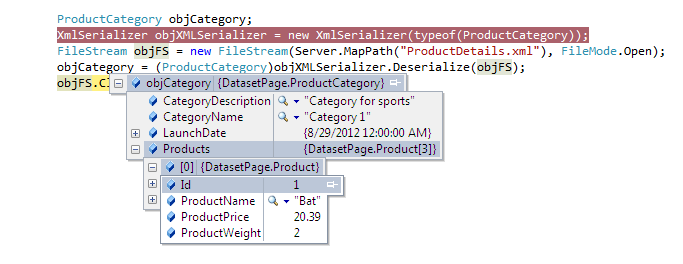
In this example we took XML serialized file "ProductDetails.xml" and deserialize this into object with populating data back.
You can see in the output image that "ProductCategory" object fill from the "ProductDetails.xml" XML File.

C# Examples :
    [XmlRoot("productCategory")]
    public class ProductCategory
    {
        [XmlElement("categoryName")]
        public string CategoryName;

        [XmlElement("categoryDescription")]
        public string CategoryDescription;
        [XmlElement(ElementName = "launchDate", DataType = "date")]
        public DateTime LaunchDate;
        [XmlArray("products")]
        [XmlArrayItem("product")]
        public Product[] Products;
        public ProductCategory()
        {
            // Default constructor for deserialization.
        }
        public ProductCategory(string categoryName, string categoryDescription, DateTime launchDate)
        {
            this.CategoryName = categoryName;
            this.CategoryDescription = categoryDescription;
            this.LaunchDate = launchDate;
        }
    }
    public class Product
    {
        [XmlElement("productName")]
        public string ProductName;
        [XmlElement("productWeight")]
        public decimal ProductWeight;
        [XmlElement("productPrice")]
        public decimal ProductPrice;
                
        [XmlAttributeAttribute(AttributeName = "id")]
        public int Id;
        public Product()
        {

        }
        public Product(int productId, string productName, decimal productWeight , decimal productPrice)
        {
            this.Id =  productId;
            this.ProductName = productName;
            this.ProductWeight = productWeight;
            this.ProductPrice = productPrice;
            
        }
    }
    protected void Page_Load(object sender, EventArgs e)
    {

        ProductCategory objCategory;
        XmlSerializer objXMLSerializer = new XmlSerializer(typeof(ProductCategory));
        FileStream objFS = new FileStream(Server.MapPath("ProductDetails.xml"), FileMode.Open);
        objCategory = (ProductCategory)objXMLSerializer.Deserialize(objFS);
        objFS.Close();

    }

VB.net Examples :
    <XmlRoot("productCategory")> _
    Public Class ProductCategory
        <XmlElement("categoryName")> _
        Public CategoryName As String

        <XmlElement("categoryDescription")> _
        Public CategoryDescription As String
        <XmlElement(ElementName:="launchDate", DataType:="date")> _
        Public LaunchDate As DateTime
        <XmlArray("products")> _
        <XmlArrayItem("product")> _
        Public Products() As Product
        Public Sub New()

        End Sub
        Public Sub New(ByVal categoryName As String, ByVal categoryDescription As String, ByVal launchDate As DateTime)
            Me.CategoryName = categoryName
            Me.CategoryDescription = categoryDescription
            Me.LaunchDate = launchDate
        End Sub
    End Class
    Public Class Product
        <XmlElement("productName")> _
        Public ProductName As String
        <XmlElement("productWeight")> _
        Public ProductWeight As Decimal
        <XmlElement("productPrice")> _
        Public ProductPrice As Decimal

        <XmlAttributeAttribute(AttributeName:="id")> _
        Public Id As Integer
        Public Sub New()

        End Sub
        Public Sub New(ByVal productId As Integer, ByVal productName As String, ByVal productWeight As Decimal, ByVal productPrice As Decimal)
            Me.Id = productId
            Me.ProductName = productName
            Me.ProductWeight = productWeight
            Me.ProductPrice = productPrice

        End Sub
    End Class
  
    Protected Sub Page_Load(ByVal sender As Object, ByVal e As System.EventArgs) Handles Me.Load

        Dim objCategory As New ProductCategory
        Dim objXMLSerializer As New XmlSerializer(Type.GetType(objCategory.ToString()))
        Dim objFS As FileStream = New FileStream(Server.MapPath("ProductDetails.xml"), FileMode.Open)
        objCategory = objXMLSerializer.Deserialize(objFS)
        objFS.Close()
    End Sub

XML File ("ProductDetails.xml") :
<?xml version="1.0"?>
<productCategory xmlns:xsi="http://www.w3.org/2001/XMLSchema-instance" xmlns:xsd="http://www.w3.org/2001/XMLSchema">
  <categoryName>Category 1</categoryName>
  <categoryDescription>Category for sports</categoryDescription>
  <launchDate>2012-08-29</launchDate>
  <products>
    <product id="1">
      <productName>Bat</productName>
      <productWeight>2</productWeight>
      <productPrice>20.39</productPrice>
    </product>
    <product id="2">
      <productName>Ball</productName>
      <productWeight>1</productWeight>
      <productPrice>2.90</productPrice>
    </product>
    <product id="3">
      <productName>Stumps</productName>
      <productWeight>3</productWeight>
      <productPrice>50.70</productPrice>
    </product>
  </products>
</productCategory>

Output : 
(To view original image , click on image)

Click Here to view "XML Serialization of Class Objects with C# Examples and VB.Net Examples". Click Here...

This is very useful .Net Tips.

For Beginning .Net articles. Click Here...

To learn more regarding XML. Click Here...

Note : Give Us your valuable feedback in comments. Give your suggestions in this article so we can update our articles accordingly that.


Wednesday, 29 August 2012

Click Here to Download XMLSerializationAndDeserializationApplication.zip

Note : This application contains both serialize and deserialize exmples. Goto File menu and Download after click on download link.

There is a need where you want objects data into XML format.
You can achieve this using XML Serialization.
Using XML Serialization you can convert custom objects data into XML and XML into custom objects.
We are using "XmlSerializer" class available in "System.Xml.Serialization" namespace.
There is some prerequisite for custom object class that need to know.

  • The classes that are going to serialize must have a default zero-argument constructor. XmlSerializer use this constructor at a time of creating the new object during deserialization process.
  • XmlSerializer serializes only public variables and properties.
  • All class properties must be readable and writable. Because XmlSerializer uses the property to retrieve information and the property to restore the data after deserialization.

To use XML serialization, you must do mark up data objects with attributes that indicate the desired XML mapping. These attributes are available in the System.Xml.Serialization namespace.
  • XmlRoot indicate the name of the root element of the XML file. By default, XmlSerializer will use the name of the class. This attribute apply to the class declaration.  
  • XmlElement indicates the element name that use for a property or public variable. By default, XmlSerializer will use the name of the property or public variable.
  • XmlAttribute indicate that a property or public variable serialized as an attribute.
  • XmlIgnore indicate that a property or public variable should not be serialized in serialization process.
  • XmlEnum indicate that the text that should be used at the time of serializing enumerated values.

Here is example for this.
In this example we serialize object into XML.
We are taking two classes "ProductCategory" and "Product". We create object of this class fill some data and generate xml using XMLSerialization.

C# Examples :
    [XmlRoot("productCategory")]
    public class ProductCategory
    {
        [XmlElement("categoryName")]
        public string CategoryName;

        [XmlElement("categoryDescription")]
        public string CategoryDescription;
        [XmlElement(ElementName = "launchDate", DataType = "date")]
        public DateTime LaunchDate;
        [XmlArray("products")]
        [XmlArrayItem("product")]
        public Product[] Products;
        public ProductCategory()
        {

        }
        public ProductCategory(string categoryName, string categoryDescription, DateTime launchDate)
        {
            this.CategoryName = categoryName;
            this.CategoryDescription = categoryDescription;
            this.LaunchDate = launchDate;
        }
    }
    public class Product
    {
        [XmlElement("productName")]
        public string ProductName;
        [XmlElement("productWeight")]
        public decimal ProductWeight;
        [XmlElement("productPrice")]
        public decimal ProductPrice;
                
        [XmlAttributeAttribute(AttributeName = "id")]
        public int Id;
        public Product()
        {
            // Default constructor for serialization.
        }
        public Product(int productId, string productName, decimal productWeight , decimal productPrice)
        {
            this.Id =  productId;
            this.ProductName = productName;
            this.ProductWeight = productWeight;
            this.ProductPrice = productPrice;
            
        }
    }
    protected void Page_Load(object sender, EventArgs e)
    {

        // Create the product catalog.
        
        ProductCategory objCategory = new ProductCategory("Category 1", "Category for sports", DateTime.Now);
        Product[] lstProducts = new Product[3];
        lstProducts[0] = new Product(1,"Bat", 2, 20.39m);
        lstProducts[1] = new Product(2,"Ball", 1, 2.90m);
        lstProducts[2] = new Product(3,"Stumps", 3, 50.70m);
        objCategory.Products = lstProducts;
        XmlSerializer objXMLSerializer = new XmlSerializer(typeof(ProductCategory));
        FileStream objFS = new FileStream( Server.MapPath( "ProductDetails.xml"), FileMode.Create);
        objXMLSerializer.Serialize(objFS, objCategory);
        objFS.Close();
    }

VB.net Examples :
    <XmlRoot("productCategory")> _
    Public Class ProductCategory
        <XmlElement("categoryName")> _
        Public CategoryName As String

        <XmlElement("categoryDescription")> _
        Public CategoryDescription As String
        <XmlElement(ElementName:="launchDate", DataType:="date")> _
        Public LaunchDate As DateTime
        <XmlArray("products")> _
        <XmlArrayItem("product")> _
        Public Products() As Product
        Public Sub New()

        End Sub
        Public Sub New(ByVal categoryName As String, ByVal categoryDescription As String, ByVal launchDate As DateTime)
            Me.CategoryName = categoryName
            Me.CategoryDescription = categoryDescription
            Me.LaunchDate = launchDate
        End Sub
    End Class
    Public Class Product
        <XmlElement("productName")> _
        Public ProductName As String
        <XmlElement("productWeight")> _
        Public ProductWeight As Decimal
        <XmlElement("productPrice")> _
        Public ProductPrice As Decimal

        <XmlAttributeAttribute(AttributeName:="id")> _
        Public Id As Integer
        Public Sub New()

        End Sub
        Public Sub New(ByVal productId As Integer, ByVal productName As String, ByVal productWeight As Decimal, ByVal productPrice As Decimal)
            Me.Id = productId
            Me.ProductName = productName
            Me.ProductWeight = productWeight
            Me.ProductPrice = productPrice

        End Sub
    End Class


    Protected Sub Page_Load(ByVal sender As Object, ByVal e As System.EventArgs) Handles Me.Load

        Dim objCategory As ProductCategory = New ProductCategory("Category 1", "Category for sports", DateTime.Now)
        Dim lstProducts() As Product = New Product(2) {}
        lstProducts(0) = New Product(1, "Bat", 2, 20.39)
        lstProducts(1) = New Product(2, "Ball", 1, 2.9)
        lstProducts(2) = New Product(3, "Stumps", 3, 50.7)
        objCategory.Products = lstProducts
        Dim objXMLSerializer As XmlSerializer = New XmlSerializer(Type.GetType(objCategory.ToString()))
        Dim objFS As FileStream = New FileStream(Server.MapPath("ProductDetails.xml"), FileMode.Create)
        objXMLSerializer.Serialize(objFS, objCategory)
        objFS.Close()

    End Sub

Output XML File ("ProductDetails.xml") :
<?xml version="1.0"?>
<productCategory xmlns:xsi="http://www.w3.org/2001/XMLSchema-instance" xmlns:xsd="http://www.w3.org/2001/XMLSchema">
  <categoryName>Category 1</categoryName>
  <categoryDescription>Category for sports</categoryDescription>
  <launchDate>2012-08-29</launchDate>
  <products>
    <product id="1">
      <productName>Bat</productName>
      <productWeight>2</productWeight>
      <productPrice>20.39</productPrice>
    </product>
    <product id="2">
      <productName>Ball</productName>
      <productWeight>1</productWeight>
      <productPrice>2.90</productPrice>
    </product>
    <product id="3">
      <productName>Stumps</productName>
      <productWeight>3</productWeight>
      <productPrice>50.70</productPrice>
    </product>
  </products>
</productCategory>

Click Here to View "XML Deserialization with C# Examples and VB.Net Examples". Click Here...

This is very useful .Net Tips.

For Beginning .Net articles. Click Here...

To learn more regarding XML. Click Here...

Note : Give Us your valuable feedback in comments. Give your suggestions in this article so we can update our articles accordingly that.