Monday, 6 August 2012

We can get all SQL server instances of our Local Network (LAN).
We are using GetDataSources method of the System.Data.Sql.SqlDataSourceEnumerator class.
We are using System.Data.Sql.SqlDataSourceEnumerator.Instance static property and call it's GetDataSources Method.
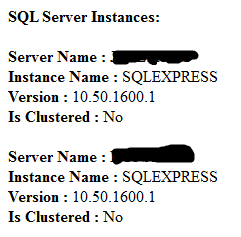
GetDataSources Method returns DataTable , this datatable contains ServerName, InstanceName, IsClustered and Version columns.

  • ServerName : Name of the server where the SQL Server instance is hosted
  • InstanceName : Name of the SQL Server instance. the string is empty if the SQL Server is the default instance
  • IsClustered : Indicate that whether the SQL Server instance is part of a cluster
  • Version : Version of the SQL Server instance

Here is example for this.
In this Example it will list out all sql server instance accessible and visible on the network.

C# Examples :
        using (DataTable dtSqlSources = System.Data.Sql.SqlDataSourceEnumerator.Instance.GetDataSources())
        {
            Response.Write("<b>SQL Server Instances:</b>");
            Response.Write("<br/><br/>");

            foreach (DataRow objDR in dtSqlSources.Rows)
            {
                Response.Write(string.Format("<b>Server Name : </b>{0}", objDR["ServerName"]));
                Response.Write("<br/>");
                Response.Write(string.Format("<b>Instance Name : </b>{0}", objDR["InstanceName"]));
                Response.Write("<br/>");
                Response.Write(string.Format("<b>Version : </b>{0}", objDR["Version"]));
                Response.Write("<br/>");
                Response.Write(string.Format("<b>Is Clustered : </b>{0}", objDR["IsClustered"]));
                
                Response.Write("<br/><br/>");
            }
        }

VB.net Examples :
        Using dtSqlSources As DataTable = System.Data.Sql.SqlDataSourceEnumerator.Instance.GetDataSources()
            Response.Write("<b>SQL Server Instances:</b>")
            Response.Write("<br/><br/>")

            For Each objDR As DataRow In dtSqlSources.Rows
                Response.Write(String.Format("<b>Server Name : </b>{0}", objDR("ServerName")))
                Response.Write("<br/>")
                Response.Write(String.Format("<b>Instance Name : </b>{0}", objDR("InstanceName")))
                Response.Write("<br/>")
                Response.Write(String.Format("<b>Version : </b>{0}", objDR("Version")))
                Response.Write("<br/>")
                Response.Write(String.Format("<b>Is Clustered : </b>{0}", objDR("IsClustered")))

                Response.Write("<br/><br/>")
            Next
        End Using

Output :


This type of C# Tips is very useful in day to day programming life.

Note : Give Us your valuable feedback in comments. Give your suggestions in this article so we can update our articles accordingly that.


Saturday, 4 August 2012

You can union of two LINQ query or Results.
You can also say combine records from two LINQ query or Results.
We are using "Union" method of  LINQ.
In this example we combine or union records from two DataTable using LINQ.

Here is example of this.
In this example we execute two different LINQ Query on DataTable and find two different results object. After that we combine those records and display.

C# Examples :
        DataSet ds = new DataSet();
        DataTable dt = new DataTable();
        DataColumn dc;
        DataRow dr;
        ds.DataSetName = "products";
        dt.TableName = "product";

        dc = new DataColumn("product_id",long.MaxValue.GetType());
        dt.Columns.Add(dc);

        dc = new DataColumn("product_name");
        dt.Columns.Add(dc);

        dr = dt.NewRow();
        dr["product_id"] = 1;
        dr["product_name"] = "Monitor";
        dt.Rows.Add(dr);

        dr = dt.NewRow();
        dr["product_id"] = 2;
        dr["product_name"] = "Mouse";
        dt.Rows.Add(dr);

        dr = dt.NewRow();
        dr["product_id"] = 3;
        dr["product_name"] = "KeyBoard";
        dt.Rows.Add(dr);

        dr = dt.NewRow();
        dr["product_id"] = 4;
        dr["product_name"] = "LCD";
        dt.Rows.Add(dr);

        ds.Tables.Add(dt);

        IEnumerable<DataRow> objResult1 = from tbl in dt.AsEnumerable()
                                       where tbl.Field<long>(0) >=3
                                       select tbl;

        Response.Write("<b>Query Results 1</b>");
        foreach (DataRow row in objResult1)
        {
            Response.Write(string.Format("<br/>Product ID: {0} ,  Product Name: {1}", row.Field<long>(0), row.Field<string>(1)));
        }

        IEnumerable<DataRow> objResult2 = from tbl in ds.Tables[0].AsEnumerable()
                                       let product_name = tbl.Field<string>(1)
                                       where product_name.StartsWith("Key")
                                       || product_name.StartsWith("Mo")
                                       select tbl;

        Response.Write("<br/><br/><b>Query Results 2</b>");
        foreach (DataRow row in objResult2)
        {
            Response.Write(string.Format("<br/>Product ID: {0} ,  Product Name: {1}", row.Field<long>(0), row.Field<string>(1)));
        }


        IEnumerable<DataRow> objUnionResult = objResult1.Union(objResult2);

        Response.Write("<br/><br/><b>Union Query Results</b>");
        foreach (DataRow row in objUnionResult)
        {
            Response.Write(string.Format("<br/>Product ID: {0} ,  Product Name: {1}", row.Field<long>(0), row.Field<string>(1)));
        }
        Response.Write("<br/><br/>");

VB.net Examples :
        Dim ds As New DataSet()
        Dim dt As New DataTable()
        Dim dc As DataColumn
        Dim dr As DataRow
        ds.DataSetName = "products"
        dt.TableName = "product"

        dc = New DataColumn("product_id", Long.MaxValue.GetType())
        dt.Columns.Add(dc)

        dc = New DataColumn("product_name")
        dt.Columns.Add(dc)

        dr = dt.NewRow()
        dr("product_id") = 1
        dr("product_name") = "Monitor"
        dt.Rows.Add(dr)

        dr = dt.NewRow()
        dr("product_id") = 2
        dr("product_name") = "Mouse"
        dt.Rows.Add(dr)

        dr = dt.NewRow()
        dr("product_id") = 3
        dr("product_name") = "KeyBoard"
        dt.Rows.Add(dr)

        dr = dt.NewRow()
        dr("product_id") = 4
        dr("product_name") = "LCD"
        dt.Rows.Add(dr)

        ds.Tables.Add(dt)

        Dim objResult1 As IEnumerable(Of DataRow) = From tbl In dt.AsEnumerable()
                                      Where tbl.Field(Of Long)(0) >= 3
                                      Select tbl

        Response.Write("<b>Query Results 1</b>")
        For Each row As DataRow In objResult1
            Response.Write(String.Format("<br/>Product ID: {0} ,  Product Name: {1}", row.Field(Of Long)(0), row.Field(Of String)(1)))
        Next

        Dim objResult2 As IEnumerable(Of DataRow) = From tbl In ds.Tables(0).AsEnumerable()
                                    Let product_name = tbl.Field(Of String)(1)
                                    Where product_name.StartsWith("Key") Or product_name.StartsWith("Mo")
                                    Select tbl

        Response.Write("<br/><br/><b>Query Results 2</b>")
        For Each row As DataRow In objResult2
            Response.Write(String.Format("<br/>Product ID: {0} ,  Product Name: {1}", row.Field(Of Long)(0), row.Field(Of String)(1)))
        Next

        Dim objUnionResult As IEnumerable(Of DataRow) = objResult1.Union(objResult2)

        Response.Write("<br/><br/><b>Union Query Results</b>")
        For Each row As DataRow In objUnionResult
            Response.Write(String.Format("<br/>Product ID: {0} ,  Product Name: {1}", row.Field(Of Long)(0), row.Field(Of String)(1)))
        Next
        Response.Write("<br/><br/>")

Output : 


This type of C# Tips is very useful in day to day programming life.

Note : Give Us your valuable feedback in comments. Give your suggestions in this article so we can update our articles accordingly that.


Friday, 3 August 2012

You can delete data or records into SQL Server Database tables using SqlCommand Class.
You can use "ExecuteNonQuery" method of SqlCommand Class.
You can delete all or particular criteria records using where clause.
This article is very useful for .Net Beginners


Here is example for this.
In this example we delete record from "product_master" table. In this table we have two columns. First product_id it's data type is bigint and this is an Identity column, and Second is product_name it's datatype is nvarchar(500). "product_id" is an identity column.
We delete record by it's product_id, so only one record is deleted.
"ExecuteNonQuery" method also returns affrected records count as integer. so you can check that records is deleted or not and also get how many records are deleted.

C# Examples :
        DataTable objTable = new DataTable();
        int intAffectedRecordsCount = 0;
        SqlConnection objConn = new SqlConnection();
        objConn.ConnectionString = @"Data Source=.\SQLEXPRESS;" +
                                   "Initial Catalog=TempDatabase;" +
                                   "User ID=sa;Password=sa;";  

        SqlCommand objcmd = new SqlCommand();
        objcmd.CommandText = "DELETE FROM product_master WHERE product_id=@product_id";
        objcmd.Parameters.AddWithValue("@product_id", 12);
        objcmd.CommandType = CommandType.Text;
        objcmd.Connection = objConn;
        objcmd.Connection.Open();

        intAffectedRecordsCount=objcmd.ExecuteNonQuery();
        Response.Write("<b>Affrected Records Count : </b> " + intAffectedRecordsCount);
        objcmd.Connection.Close();

        objcmd.Dispose();
        objConn.Dispose();

VB.net Examples :
        Dim objTable As New DataTable()
        Dim intAffectedRecordsCount As Integer = 0
        Dim objConn As New SqlConnection()
        objConn.ConnectionString = "Data Source=.\SQLEXPRESS;" & _
                                   "Initial Catalog=TempDatabase;" & _
                                   "User ID=sa;Password=sa;"

        Dim objcmd As New SqlCommand()
        objcmd.CommandText = "DELETE FROM product_master WHERE product_id=@product_id"
        objcmd.Parameters.AddWithValue("@product_id", 12)
        objcmd.CommandType = CommandType.Text
        objcmd.Connection = objConn

        objcmd.Connection.Open()

        intAffectedRecordsCount = objcmd.ExecuteNonQuery()
        Response.Write("<b>Affrected Records Count : </b> " & intAffectedRecordsCount)

        objcmd.Connection.Close()

        objcmd.Dispose()
        objConn.Dispose()

Output :

Learn other ADO.Net Examples over here. Click Here...

Note : Give Us your valuable feedback in comments. Give your suggestions in this article so we can update our articles accordingly that.


Wednesday, 1 August 2012

You can get Operation System (OS) name and major version and minor version details,service pack and build details of server using  "System.Environment" class.
We can use OSVersion property of Environment Class which will return "OperatingSystem" class.

Here is example for this.
In this example we display server name ,it's version details , service pack and build details.

C# Examples :
        Response.Write("<b>OS Platform :</b> " + Environment.OSVersion.Platform);
        Response.Write("<br/><br/>");
        Response.Write("<b>OS Major Version :</b> " + Environment.OSVersion.Version.Major);
        Response.Write("<br/><br/>");
        Response.Write("<b>OS Minor Version :</b> " + Environment.OSVersion.Version.Minor);
        Response.Write("<br/><br/>");
        Response.Write("<b>OS Build number :</b> " + Environment.OSVersion.Version.Build);
        Response.Write("<br/><br/>");
        Response.Write("<b>OS Service Pack :</b> " + Environment.OSVersion.ServicePack);
        Response.Write("<br/><br/>");
        Response.Write("<b>OS Version String :</b> " + Environment.OSVersion.VersionString);

VB.net Example :
        Response.Write("<b>OS Platform :</b> " & Environment.OSVersion.Platform.ToString())
        Response.Write("<br/><br/>")
        Response.Write("<b>OS Major Version :</b> " & Environment.OSVersion.Version.Major)
        Response.Write("<br/><br/>")
        Response.Write("<b>OS Minor Version :</b> " & Environment.OSVersion.Version.Minor)
        Response.Write("<br/><br/>")
        Response.Write("<b>OS Build number :</b> " & Environment.OSVersion.Version.Build)
        Response.Write("<br/><br/>")
        Response.Write("<b>OS Service Pack :</b> " & Environment.OSVersion.ServicePack)
        Response.Write("<br/><br/>")
        Response.Write("<b>OS Version String :</b> " & Environment.OSVersion.VersionString)
        Response.Write("<br/><br/>")

Output :

This type of C# Tips is very useful in day to day programming life.

Note : Give Us your valuable feedback in comments. Give your suggestions in this article so we can update our articles accordingly that.


Tuesday, 31 July 2012

You can get IP Address of a fully qualified host name. We can Use GetHostEntry method of the System.Net.Dns class. There are multiple IP Addresses for some host name.

Here is Example for this.
In this example we can get IP address of our given host name. We provide "jayeshsorathia.blogspot.com" as a host name. It will return Multiple IP Addresses.
We will also attach another output screen in which we supplied "www.microsoft.com" as a hostname.

C# Examples :
        string strHostName = "jayeshsorathia.blogspot.com";
        //string strHostName = "www.microsoft.com";
        // Get DNS entry of specified host name
        IPAddress[] addresses = Dns.GetHostEntry(strHostName).AddressList;

        // The DNS entry may contains more than one IP addresses.
        // Iterate them and display each along with the type of address (AddressFamily).
        foreach (IPAddress address in addresses)
        {
            Response.Write(string.Format("{0} = {1} ({2})", strHostName, address, address.AddressFamily));
            Response.Write("<br/><br/>");
        }

VB.net Examples :
        Dim strHostName As String = "jayeshsorathia.blogspot.com"
        'string strHostName = "www.microsoft.com";
        ' Get DNS entry of specified host name
        Dim addresses As IPAddress() = Dns.GetHostEntry(strHostName).AddressList

        ' The DNS entry may contains more than one IP addresses.
        ' Iterate them and display each along with the type of address (AddressFamily).
        For Each address As IPAddress In addresses
            Response.Write(String.Format("{0} = {1} ({2})", strHostName, address, address.AddressFamily))
            Response.Write("<br/><br/>")
        Next

Output (jayeshsorathia.blogspot.com)

Output (www.microsoft.com) :

This type of C# Tips is very useful in day to day programming life.

Note : Give Us your valuable feedback in comments. Give your suggestions in this article so we can update our articles accordingly that.


Monday, 30 July 2012

You can use System.UriBuilder class to build a new well-formed URI.
You can also say create a well-formed URL.
You need to set some property of UriBuilder object's , like Scheme , Port , Host , Path etc....
You can get generated URI using AbsoluteUri Method.
This is very useful article for .Net Beginners.

Here is example for this.
In this example we construct one URI using UriBuilder Class.

C# Examples :
    // Generate a new URI.
    UriBuilder objUri = new UriBuilder();
    objUri.Scheme = "http";
    objUri.Port = 80;
    objUri.Host = "www.microsoft.com";
    objUri.Path = "en-us/default.aspx";

    Response.Write("<b>Genereted URI:</b> " + objUri.Uri.AbsoluteUri);

VB.net Examples :
        ' Generate a new URI.
        Dim objUri As New UriBuilder()
        objUri.Scheme = "http"
        objUri.Port = 80
        objUri.Host = "www.microsoft.com"
        objUri.Path = "en-us/default.aspx"

        Response.Write("<b>Genereted URI:</b> " + objUri.Uri.AbsoluteUri)

Output :


This type of C# Tips is very useful in day to day programming life.

Note : Give Us your valuable feedback in comments. Give your suggestions in this article so we can update our articles accordingly that.


Saturday, 28 July 2012

You can update data or records into SQL Server Database tables using SqlCommand Class.
You can use "ExecuteNonQuery" method of SqlCommand Class.
You can update all or particular criteria records using where clause.
This article is very useful for .Net Beginners

Here is example for this.
In this example we update record in "product_master" table. In this table we have two columns. First product_id it's data type is bigint and this is an Identity column, and Second is product_name it's datatype is nvarchar(500). "product_id" is an identity column.
We update product name by it's product_id column, so only one record is updated.
"ExecuteNonQuery" method also returns affected records count as integer. so you can check that records is updated or not and also get how many records are updated.

C# Examples :
        DataTable objTable = new DataTable();
        int intAffectedRecordsCount = 0;
        SqlConnection objConn = new SqlConnection();
        objConn.ConnectionString = @"Data Source=.\SQLEXPRESS;" +
                                   "Initial Catalog=TempDatabase;" +
                                   "User ID=sa;Password=sa;";  

        SqlCommand objcmd = new SqlCommand();
        objcmd.CommandText = "UPDATE product_master SET product_name =@product_name WHERE product_id=@product_id";
        objcmd.Parameters.AddWithValue("@product_name", "Cabinet");
        objcmd.Parameters.AddWithValue("@product_id", 12);
        objcmd.CommandType = CommandType.Text;
        objcmd.Connection = objConn;
        objcmd.Connection.Open();

        intAffectedRecordsCount=objcmd.ExecuteNonQuery();
        Response.Write("<b>Affrected Records Count : </b> " + intAffectedRecordsCount);
        objcmd.Connection.Close();

        objcmd.Dispose();
        objConn.Dispose();

VB.net Examples :
        Dim objTable As New DataTable()
        Dim intAffectedRecordsCount As Integer = 0
        Dim objConn As New SqlConnection()
        objConn.ConnectionString = "Data Source=.\SQLEXPRESS;" & _
                                   "Initial Catalog=TempDatabase;" & _
                                   "User ID=sa;Password=sa;"

        Dim objcmd As New SqlCommand()
        objcmd.CommandText = "UPDATE product_master SET product_name =@product_name WHERE product_id=@product_id"
        objcmd.Parameters.AddWithValue("@product_name", "Cabinet")
        objcmd.Parameters.AddWithValue("@product_id", 12)
        objcmd.CommandType = CommandType.Text
        objcmd.Connection = objConn

        objcmd.Connection.Open()

        intAffectedRecordsCount = objcmd.ExecuteNonQuery()
        Response.Write("<b>Affrected Records Count : </b> " & intAffectedRecordsCount)

        objcmd.Connection.Close()

        objcmd.Dispose()
        objConn.Dispose()

Output :


Learn other ADO.Net Examples over here. Click Here...

Note : Give Us your valuable feedback in comments. Give your suggestions in this article so we can update our articles accordingly that.